
For support leads on Salesforce
Hear from every customer the day their case closes. Fix the ones who are not happy before they leave.
AutoSurvey asks the question inside Salesforce and puts the answer on the case. Your team sees it where they already work.
of design partner slots taken. The trial org needs no credit card.
Catch the unhappy customer while you can still keep them
A low score lands on the case, next to the agent's name, within minutes of the answer. Your team acts on it the same day, not at the end of the quarter. Your admin adds one Flow to alert the case owner.
Stop rebuilding the same report every month
Every answer is a Salesforce record on the case and the contact. The reports and dashboards you already have read it. No export. No spreadsheet. No matching emails to names by hand.
Set it up once. Your team never learns a new tool
The survey goes out when the case closes, with no extra step for the agent. Customers get one link. Agents see the answer on the case. Nobody logs in to a second system, and you pay for nothing outside Salesforce.
Try it now. No login.
Take the survey your customer gets when their case closes
This is a real AutoSurvey survey, running on a Salesforce site. It asks about a support contact with a demo company, Northwind Home Energy. It has 3 short screens (one more if you tell us you are unhappy).
Use imaginary details. The answers go to our demo org, and nobody contacts you. In your org, the same answer becomes a record on the case and the contact.
Opens in a new tab.
See what else it can do
- The NPS demo — a score, then the reason, read together.
- The Daily Grind walk-in demo — a coffee shop survey a customer opens from a QR code.
- See all demos →
Northwind Home Energy
How did our support do?
1 of 3 · One quick check
Did you contact our support team in the last 30 days?
What your team sees
A low score lands on the case, with the reason
This is the same demo survey, answered by an unhappy customer and opened in Salesforce. The score, what went wrong, and the request for a call back sit on the case record, where your team can act on them.
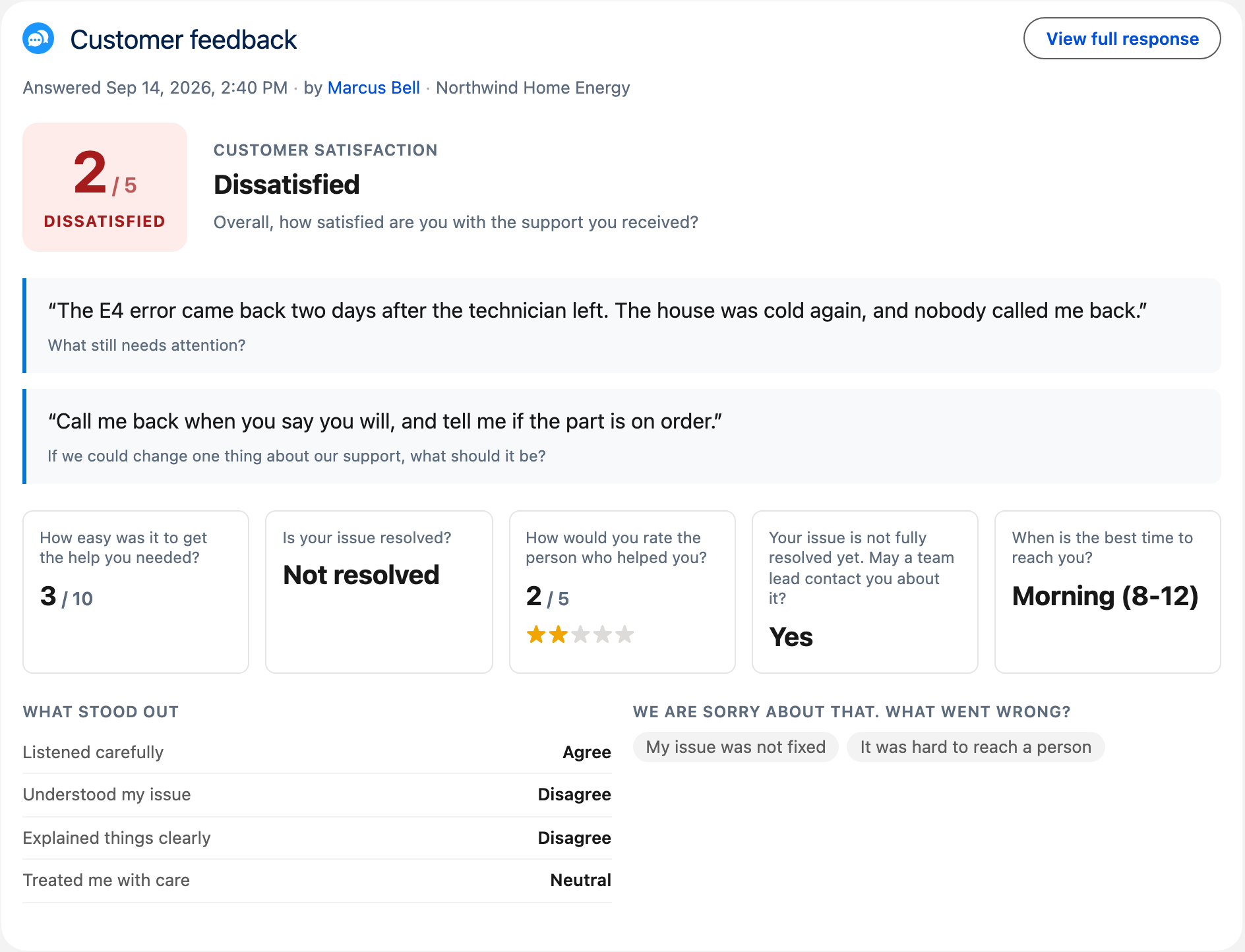
From our demo org. Northwind Home Energy and the customer are made up.
The answers count themselves. You stop rebuilding the report
This is the Results tab of the same demo survey. Every question adds up its own answers while they arrive, next to the score, the trend and the channel that brought each response. The same records feed the Salesforce reports and dashboards you already have.
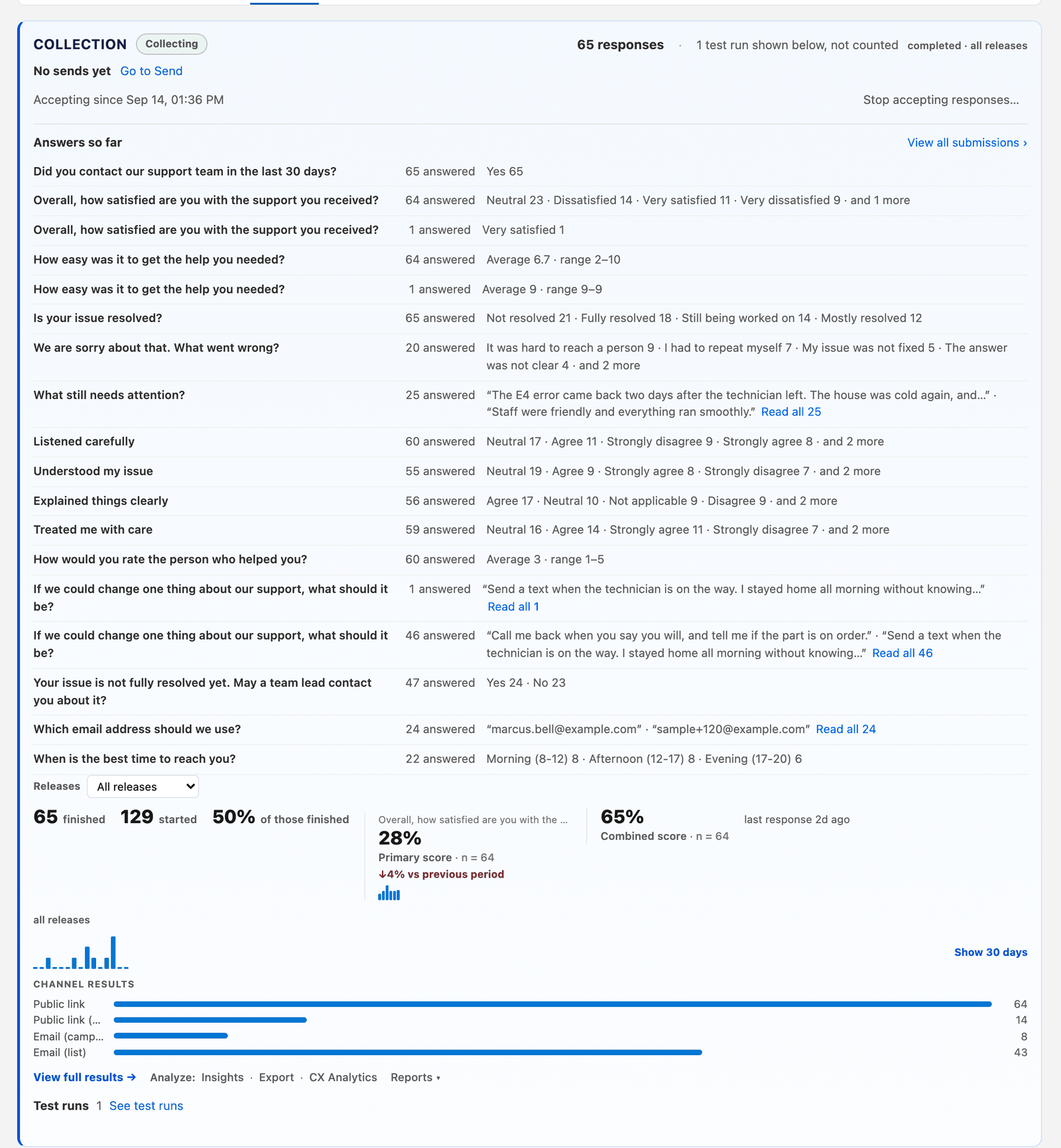
From our demo org. The survey, the company and the numbers are made up.
This is for you if
You lead a support team that closes cases in Salesforce Service Cloud and closes 50 or more cases a week.
This is not for you if
Your team does not use Salesforce, or you only need a one-time survey with no record behind it.
Help us test it. Founding customers pay half.
AutoSurvey is $4,800 per org per year. Every user, every response, no add-ons. Founding customers pay half, locked for three years.
Founding companies
$2,400
Per org per year, locked for three years. For the first 10 companies. of taken.
Founding nonprofits
$1,200
Per org per year, locked for three years: 75% off for the first ten. From slot 11, nonprofits pay $2,400. of taken.
Design partners
Year 1 free
Then the founding price for years 2 and 3. Five design partners, companies or nonprofits, inside the 20 founding slots. of taken.
A nonprofit is a Salesforce Power of Us member, or a registered charity (a 501(c)(3) or the equivalent). The form asks for your charity number. A founding customer pays from day one. Only a design partner has a free first year.
You get
- A trial org within one business day
- Your founding price, locked for three years, in your own org when the AppExchange listing goes live
- A direct line to the founder
A design partner gives
- One real survey, run with real customers
- Two calls
- A named quote or a case study
- Honest feedback
What you need
For the trial org
- A browser and the login we email you. Nothing to install.
- No Salesforce license. The trial org is ours, and nothing changes in your production org.
- You build your own surveys in it: from a prompt, a pasted question list, a spreadsheet, or an import from GetFeedback, Typeform, Google Forms, or SurveyMonkey.
- AI authoring is included. No Agentforce license.
For your own org, when the listing goes live
- A Salesforce admin installs the package and assigns the permission sets. Setup Home walks the admin through four checks.
- To send surveys to people outside Salesforce, your admin publishes a Salesforce site for the survey link. AutoSurvey sets the site up; your admin approves it.
- Tested in Developer Edition orgs and Enterprise Edition sandboxes. Professional Edition is not tested yet.
- Google Sheets is optional. Respondent answers stay in your org. Survey design content goes to Google Sheets only if you use it, and to the AI provider you pick.

You work with me
Erik Rogers, founder and lead engineer
I’ve worked as a Salesforce developer and architect since 2008, on consulting projects and in-house teams. I built AutoSurvey myself, from start to finish.
Your survey data stays in your Salesforce org. I set up every trial org myself, and if you have a question, I’m the one who answers it.
Request your slot
Slot request received.
You will get a login by email within one business day.