
Program Slot Booking · an AutoSurvey add-on
Let participants book the times you publish.
Your program runs intake appointments or class sessions. Today the open times live in a spreadsheet and fill by phone. Program Slot Booking puts those times in Salesforce. An invited participant chooses a time from a phone and completes your intake through the same link, without creating an account. Your team sees each booking on the participant's record.
How it works
Publish. Book. Show up.
1 · Staff publish
A month of appointments or a whole class, in one go.
The coordinator generates the times, sets the capacity (one for an appointment, more for a class), sets the cutoffs for booking, changes and cancellations, and publishes with one toggle. Participants do not see a draft time until it is published. Staff invite the participants who are eligible; intake follows the booking.
2 · The participant books
One link. Choose an available time. Both time zones.
The invitation carries one private link. The participant sees the dates that have places, picks a time, and confirms it. The intake questions or the consent open next. A participant who stops halfway keeps the time, and staff see that the intake is still open. One booking is one appointment, or one place in a whole class.
3 · Confirmation and follow-up
Confirmation, calendar file, reminders, roster.
The confirmation carries "Change time" and "Cancel" links and a calendar file. Email reminders go out before the visit. Staff get a daily roster with who is booked, whose intake is still open, and which emails the mail service rejected, so they know whom to phone.
What Program Slot Booking looks like
Every organization, person, address and time on these screens is fictional.
For the participant
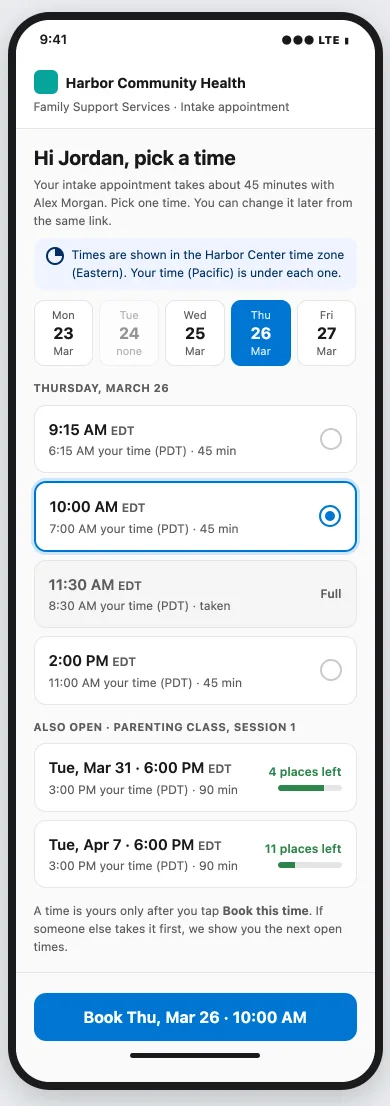
Choose a time, with the program's time and your own time shown.
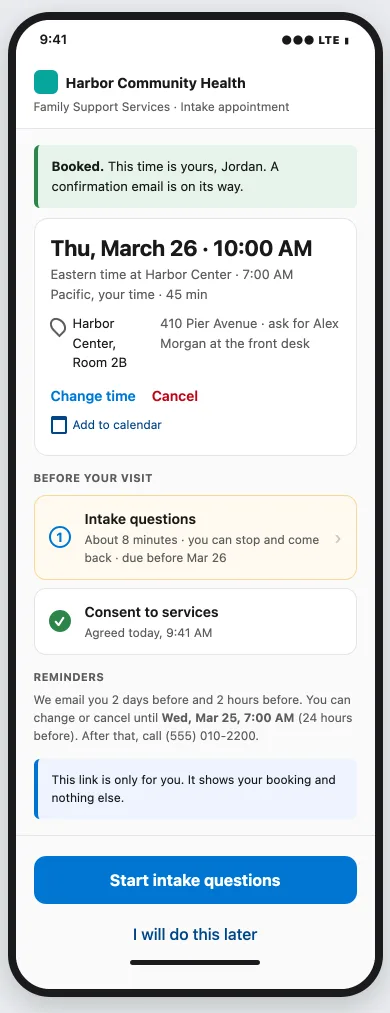
The picker shows the dates that have places, the program's time large with the participant's own time under it, and how many places a class has left. A full time says "Full". After the pick, the confirmation shows the room, both times, the cutoffs in plain words, "Change time", "Cancel", "Add to calendar", and the intake step still to complete.
For the coordinator
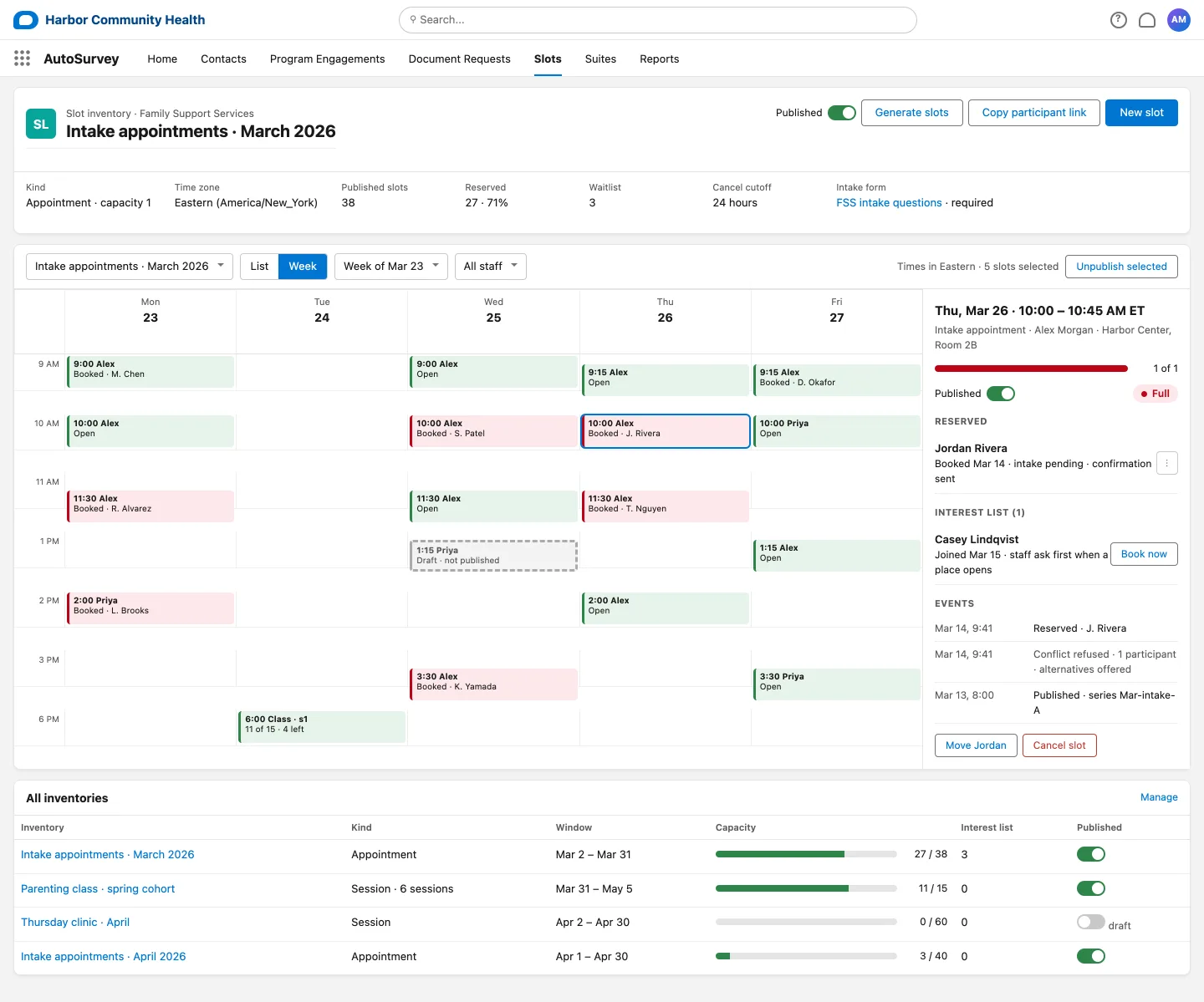
Available places, bookings and controls in one view.
The Slots view shows a week of appointments and classes with the places booked and left, a publish toggle per time and per set of times, and a draft time that participants cannot see yet. The drawer for one time shows who is booked, who asked to be told when a place opens, and the booking actions recorded on it. Staff book for a participant who calls in, move or cancel a booking with a notice, and cancel a whole time with one notice per person.
On the record
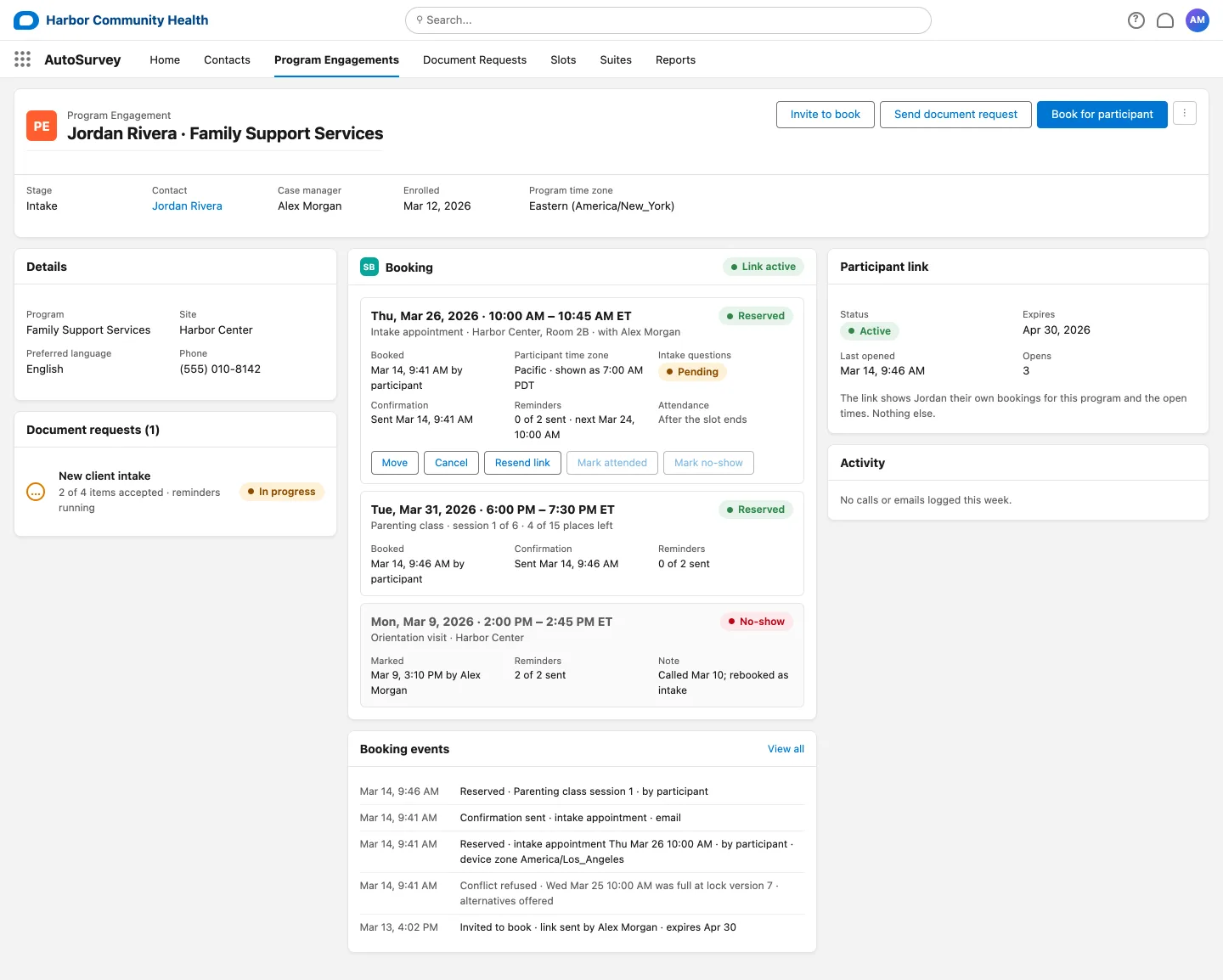
Bookings, intake status, attendance and staff actions together.
The Booking panel sits on the participant's record, a Contact, a Case or a Program Engagement as your org is set up, and shows each reservation: the time in both zones, the intake status, the confirmation and reminders sent, attendance or no-show, and the staff actions Move, Cancel, Resend link, Mark attended and Mark no-show. The booking actions are recorded in the event list. Booking records are stored in your Salesforce org.
When plans change
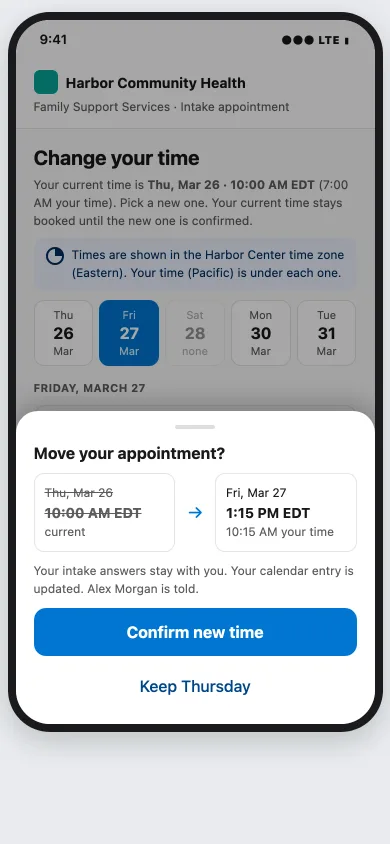
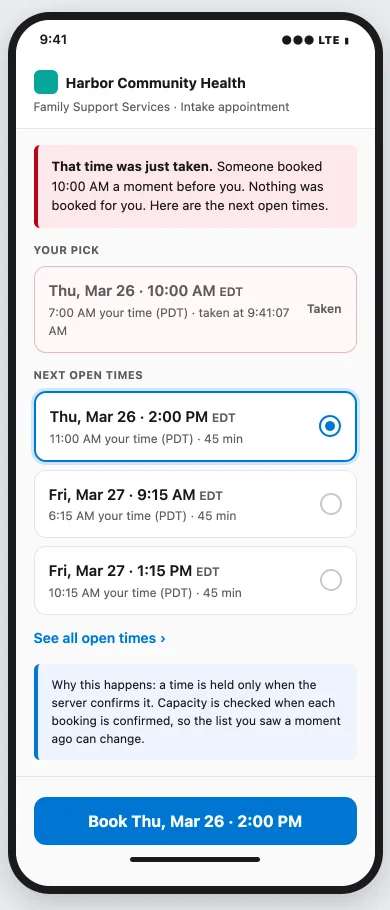
Review the old and new times before a move. When a time is taken, see the other times.
A participant picks a new time and confirms the move. The current time stays booked until the new one is confirmed; if the move does not go through, the current booking stays as it was. Intake answers travel with the booking. A consent that names the appointment is asked again. When another participant takes the last place a moment earlier, no new booking is made and the other available times are shown. If no other time is available, the participant is told that and can ask to be told when a place opens.
What it does, and what it does not do
What it does
- Publish a finite set of times for a program: appointments with one place, classes with many. One booking is one appointment, or one place in a whole class.
- Give each invited participant one private link on your AutoSurvey Experience site. No login, no account.
- Check capacity when each booking is confirmed. A retried tap does not book twice, and one participant holds one place per set of times.
- Run your intake form or consent after the booking, with save and resume. An incomplete intake does not cancel the booking by itself; staff see it on the roster.
- Let the participant change or cancel until your cutoffs, with the place returned.
- Let staff book for a participant, move or cancel a booking, cancel a time with a notice to everyone in it, and publish or unpublish.
- Keep an interest list: a participant asks to be told, and staff book the person when a place opens.
- Send a confirmation with a calendar file and email reminders, and show staff which emails the mail service rejected.
- Show the booking screens in the program's time zone and in the participant's own time zone.
- Give staff a daily roster with intake status, and record Attended or No-show per appointment or class session.
What it does not do
- Read or write Outlook or Google calendars. Staff choose the published times and check staff and room availability themselves.
- Take payments.
- Run clinic-wide appointment management. It is slot booking for a program.
- Send SMS. Email notices only.
- Offer places automatically. Staff manage the interest list.
- Let a participant pick single sessions of a course, or run an intake that must be completed before a place is given.
- See whether a sent email was opened. It shows the emails the mail service rejected.
Requires AutoSurvey and its Experience Cloud site. Staff use their own Salesforce access.
Design partner wanted
We are looking for a design partner.
Program Slot Booking is built with one organization that does this work today. You bring one program, one workflow and one person who knows the work. Before any test starts, we agree the scope, the staff time and the success criteria. If that is you, write to us.
Erik Rogers is the founder of Mindshare Studio LLC. Every person and organization on these screens is fictional.