AutoSurvey
Under development Design and proof of concept complete. We finish the build with one design partner. Is that you?

Fraud & Quality Shield

Stop paying bots for survey answers.

If you pay respondents, every bot and every repeat submitter costs you money and dirties your data. The Shield decides, for each submission to a public survey, whether it is a real person's answer. It holds the doubtful ones for review before any payout goes out.

Built for research panels, market-research firms, and programs that give gift cards for feedback. It runs inside Salesforce, on the surveys you already run with AutoSurvey. Einstein reviews every answer through the Einstein Trust Layer, with the data masked and under Salesforce's zero-data-retention terms with its model providers.

What it does

One decision per submission

The Shield scores each submission from 0 to 100 on signals you choose. The score lands in one of four decisions. You set the thresholds.

Allow

Submitted as normal.

The respondent sees the completion screen. Most real answers end here.

Flag

Submitted and marked for attention.

Counted in your analytics. The respondent sees the completion screen.

Hold

Submitted, but kept out of analytics and out of any payout.

A reviewer approves or rejects it in the queue. The respondent sees the completion screen and learns nothing.

Block

Not submitted.

The run closes as invalid. The respondent sees a polite stop screen with no reason and no count.

Why it is useful

Money not paid out. Data you can trust. Hours you get back.

Payouts stop at the queue

A held submission never reaches your payout Flow until a reviewer approves it. You set the incentive value per form, and the dashboard shows an estimated payouts-avoided figure. The label says estimated, because it is.

Clean data by default

Held and blocked submissions stay out of your reports and dashboards. Duplicate emails, duplicate devices, copied answer patterns, and straight-line responses are caught before they skew a result.

Review in minutes, not days

Every held submission shows why it was held: each rule, its measured value, and its weight. A reviewer approves or rejects in bulk. No spreadsheet export, no manual de-duplication.

Einstein only

Einstein reads the answers, through the Trust Layer

Einstein scores each submission for risk and for answer quality, and writes a one-paragraph rationale for the reviewer. It runs through the Einstein Trust Layer: Salesforce masks sensitive data, keeps an audit trail, and holds zero-data-retention agreements with the model providers it uses. Which model answers is set by your org's Einstein configuration, not by the Shield. It needs Einstein generative AI (Agentforce) enabled; without it, the rest of the Shield runs unchanged.

A challenge only when risk is raised

Pick reCAPTCHA v2, reCAPTCHA v3 or Cloudflare Turnstile. Set the challenge to never, always, or only when the policy raises risk. Most real respondents never see it.

Start in monitor mode, then tighten

Monitor mode scores everything and holds nothing. Run it for two weeks, replay a new policy against the last 30 days, and switch holds on only when the numbers look right to you.

The screens

What the Shield will look like

The Shield lives in your AutoSurvey app as three tabs: Shield, Shield Review and Shield Settings. Purple reason codes come from Einstein.

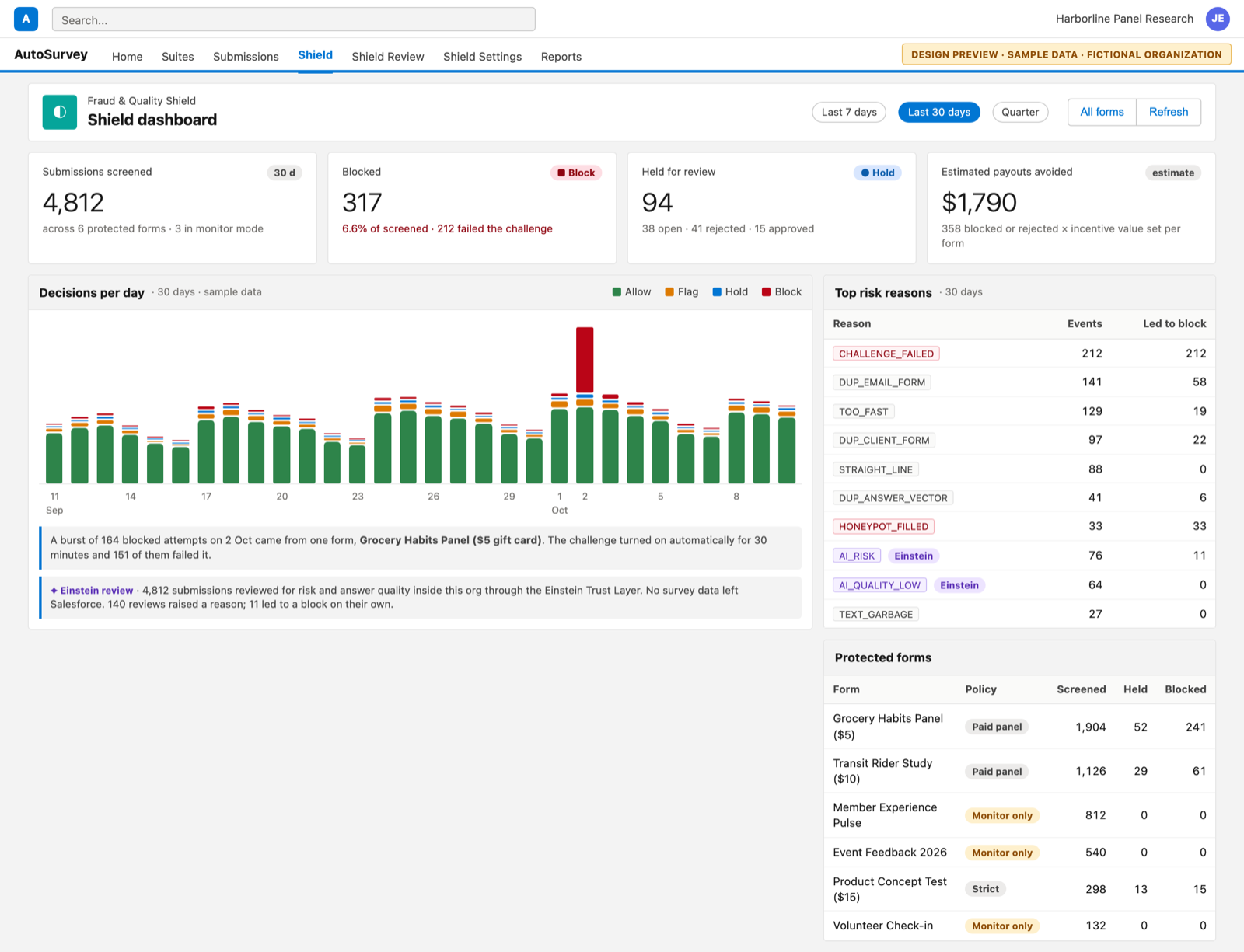
The Shield dashboard in Salesforce Lightning style: tiles for screened, blocked, held and estimated payouts avoided, a 30-day stacked bar chart of decisions, a top-reasons table and a protected-forms table.

01 · Shield dashboard

One dashboard for every protected survey

Screened, blocked, held, and an estimated payouts-avoided figure from the incentive value you set per form. A 30-day chart shows the decisions by day, so a spike of blocks is visible the morning after it happens. The top-reasons table shows how often Einstein raised a reason on its own.

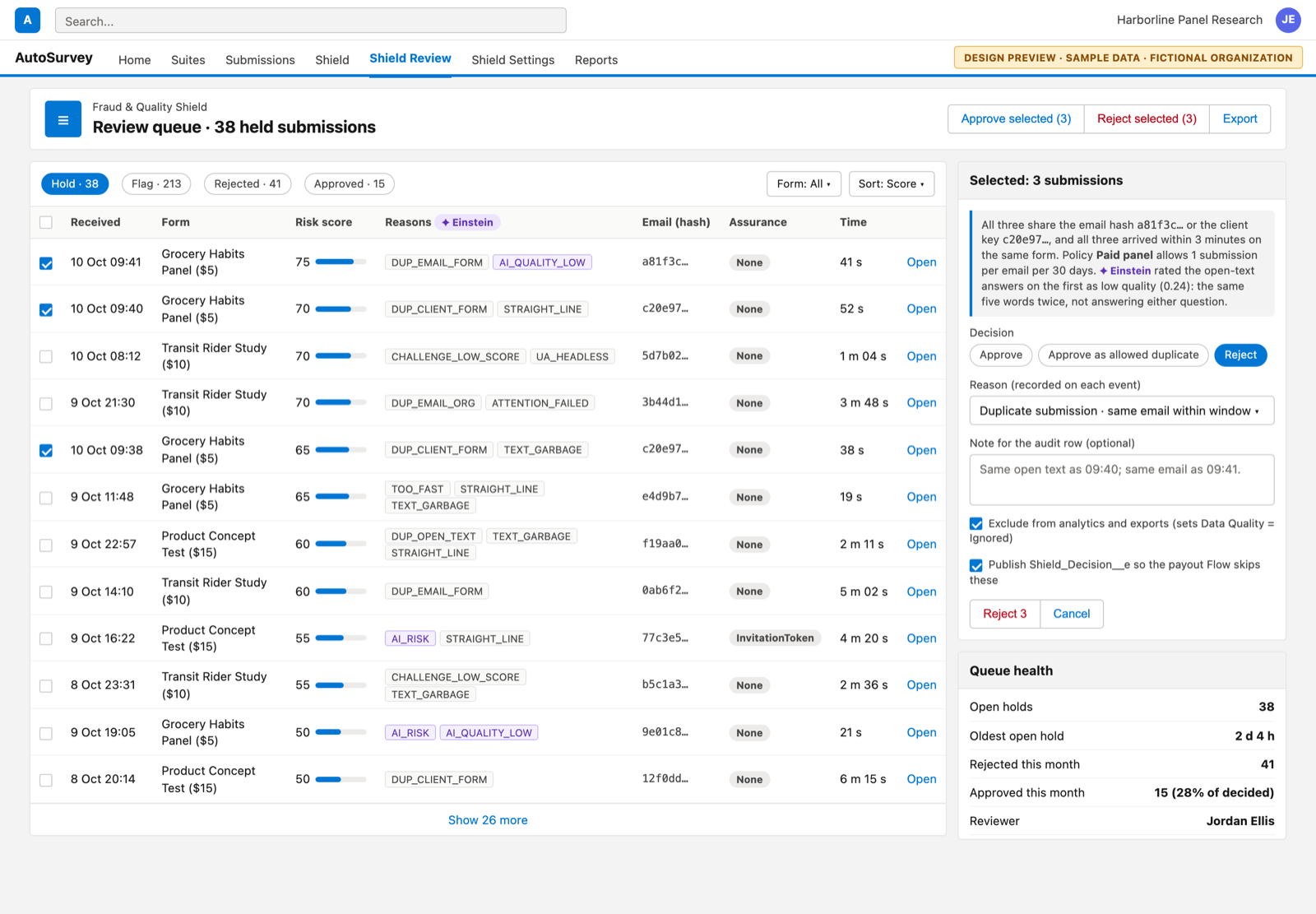
The review queue: a table of held submissions sorted by risk score, with reason codes, a hashed email prefix, time on form, and bulk approve and reject buttons.

02 · Review queue

Held submissions, with the reasons in plain codes

A reviewer sees the risk score, the reason codes, and a hashed email prefix instead of an address. Bulk approve or reject feeds your own payout Flow. Einstein's one-line verdict sits next to the selection, so the reviewer does not open each record.

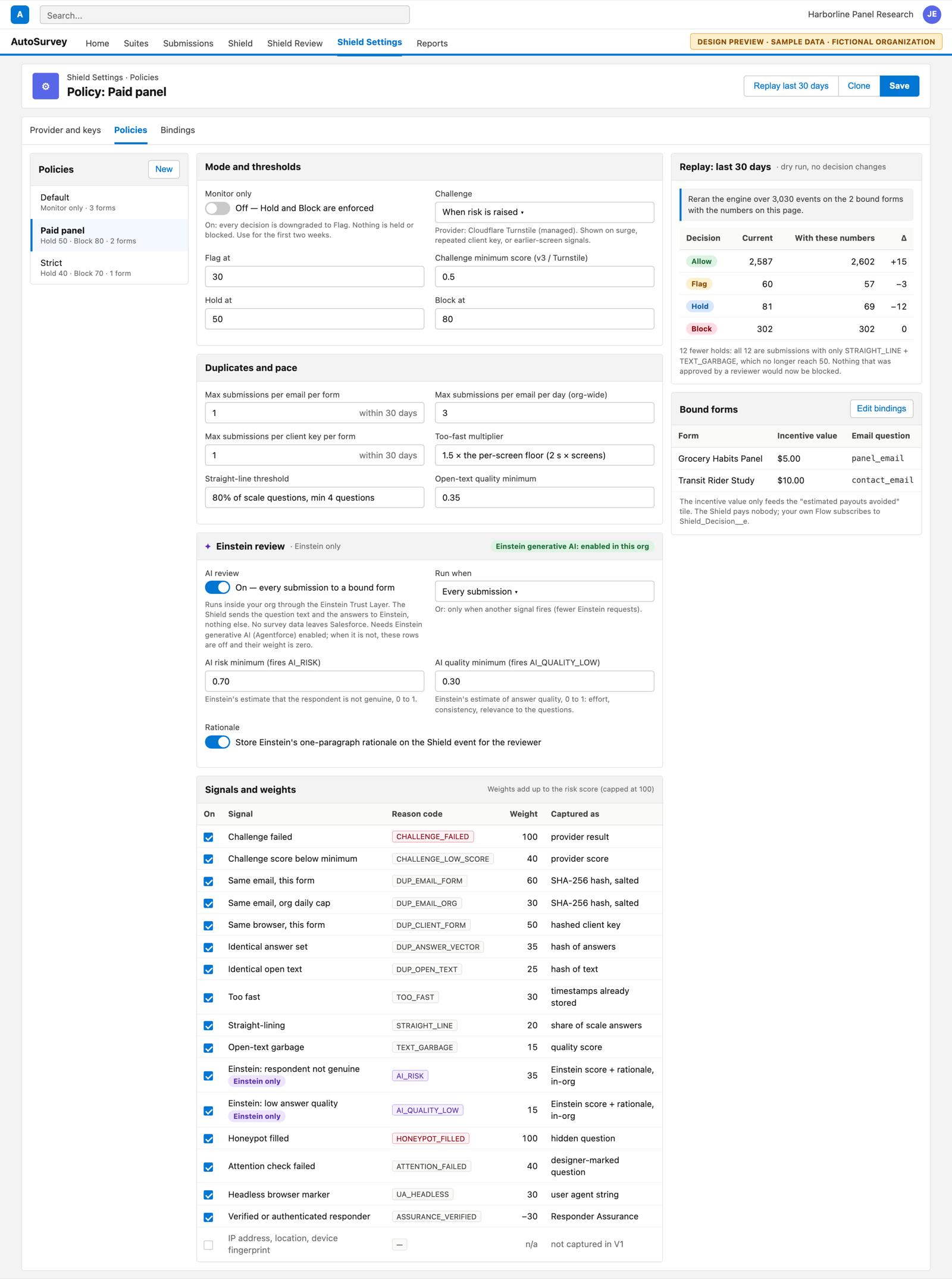
The policy configuration page: monitor-only switch, challenge provider and mode, thresholds for flag, hold and block, duplicate caps, an Einstein review section, a table of signals with weights, a replay dry-run table and the bound forms.

03 · Policy configuration

Thresholds, duplicate caps and signal weights on one page

A policy is a set of numbers you can read. A monitor-only switch for the first two weeks. The Einstein review section shows whether Einstein generative AI is enabled in the org, when Einstein runs, and the two AI thresholds. A replay shows what the new numbers would have done to the last 30 days before you save them.

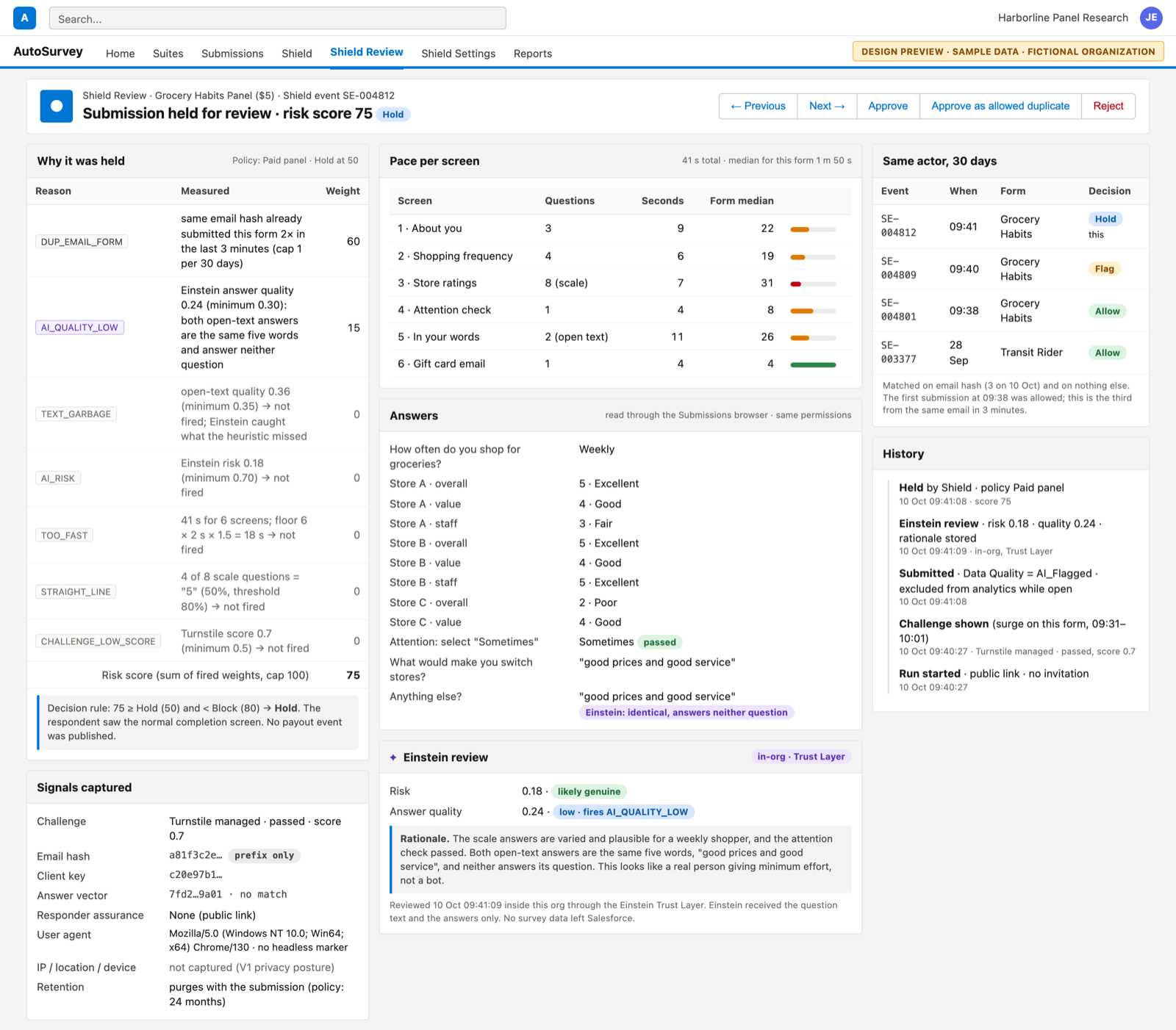
One held submission: the score and its reason codes with weights, an Einstein review card with risk and quality scores and a rationale, rules that did not fire, pace per screen against the form median, the answers, the same actor's history, and a list of signals captured that states IP, location and device are not captured.

04 · Submission risk detail

Every hold shows why

Each rule's measured value and weight, Einstein's risk and quality scores with its rationale, the pace per screen against the form's median, the answers, and the same actor's history. In this example the text heuristic missed the problem and Einstein caught it. IP address, location and device fingerprint are not captured.

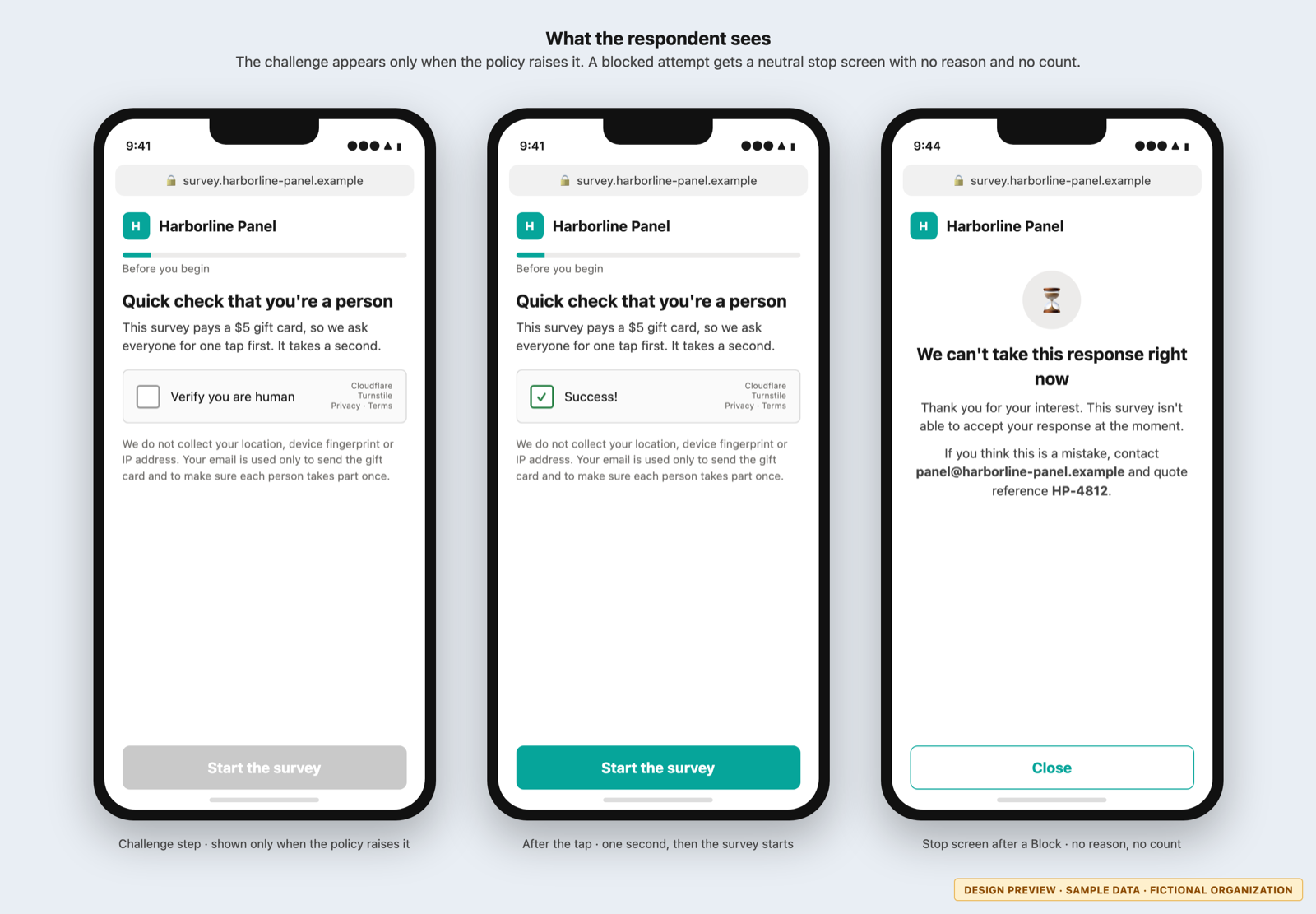
Three phone frames: a survey with a 'Verify you are human' challenge before the tap, the same challenge after a successful tap, and a neutral stop screen for a blocked attempt.

05 · The respondent's view

What a respondent sees on a phone

The challenge appears only when the policy raises it. A blocked attempt gets a neutral stop screen with no reason and no count, so a bot operator learns nothing from it.

The first version

What V1 includes

  • A challenge step: reCAPTCHA v2, reCAPTCHA v3 or Cloudflare Turnstile, set to never, always, or only when risk is raised.
  • Duplicate detection on hashed email, hashed device key, answer pattern and open text, per form and across the org.
  • Speed and attention checks: too fast per screen, straight-line answers, garbage text, a hidden honeypot field.
  • A risk engine with weighted reason codes, thresholds you set, and a monitor-only mode.
  • Einstein review of risk and answer quality with a stored rationale. Einstein only: runs through the Einstein Trust Layer and needs Einstein generative AI (Agentforce) enabled.
  • Rate limits per form and per device, on top of the guest limits already in AutoSurvey.
  • A review queue with bulk approve and reject, and a platform event your payout Flow can listen to.
  • A Shield event on every decision, for reports and dashboards you build yourself.
  • Drop-in for the AutoSurvey survey runner and for your own Screen Flow, through one invocable action.

Kept for a later version: device fingerprinting, behaviour analytics, IP reputation, email verification services, blocklists and allowlists, cross-flow risk profiles. AI review through any model that the Shield calls on its own, outside the Einstein Trust Layer, is not planned.

Privacy posture

No fingerprinting. No IP. Nothing from outside the survey page.

  • Captured: the challenge score, a salted hash of the email, a salted hash of the device key, timing per screen, answer-shape metrics, the browser's user-agent string, the honeypot flag.
  • Never captured in V1: IP address, location, device fingerprint, canvas or font probes, mouse or keystroke data.
  • AI sees the answers only. Einstein receives the question text and the answers, never the email, the device key or the user agent. The Shield calls no model of its own; every call goes through the Einstein Trust Layer and your org's Einstein configuration.
  • The Shield never stores a raw email address. A reviewer sees a six-character hash prefix. The salt is generated in your org and never leaves it.
  • Every signal has an on/off switch in the policy. If your jurisdiction forbids one, turn it off and its weight becomes zero.
  • Shield events purge on the same retention schedule as the submissions they belong to.
  • The challenge widget is the provider's own, under the provider's privacy terms. You pick the provider.

Design partner wanted

The design is done. We finish the build with one partner.

The design and the proof of concept are complete, down to the data model and the effort by phase. We finish the build with one organization that pays respondents and runs its surveys on Salesforce. You run the Shield on your own surveys, monitor mode for the first two weeks, and you tell us what the queue and the policy get wrong.

The Shield is included in the AutoSurvey price. There is no add-on charge, and you keep the price you sign at.

AutoSurvey already gives every guest survey CAPTCHA and rate limiting today. The Shield adds the queue, the policy, the duplicate checks and the Einstein review on top. See Security.

Status. The Fraud & Quality Shield is under development. The screens on this page are design previews rendered from the completed design, not screenshots of shipping software. Every organization, person and number on them is fictional sample data, and no figure is a customer result. The Einstein review needs Einstein generative AI (Agentforce) enabled in your org and is subject to Salesforce's own terms for it. Scope may change before release.