AutoSurvey
In design In design — not yet available. Screens shown are design previews. First release scope: one tokened link per program enrollment that shows a participant their assigned document requests, replacement requests and staff-shared receipts, with allow-listed contact-detail updates. Excludes: general Contact or Case records, internal notes, unrelated files, clinical history, logins or accounts, message threads; no claim about Salesforce licences. Seeking a paid design partner. Last updated 2026-10-10.

Participant Request Center · add-on in design

One link. Everything a participant owes you, and nothing else.

A case manager asks a participant for a pay stub, a lease, a signed consent. The participant sends a blurry photo, it is rejected, and the thread is lost in text messages. The Request Center gives the participant one link on a phone that shows what is still needed, why an item was sent back, and the receipts staff chose to share.

A participant request workflow for case-managed programs: housing, benefits navigation, workforce, family support. It runs inside Salesforce, on top of the AutoSurvey Document Request add-on.

What it does

Four states a participant can read at a glance

Staff see seven item statuses inside Salesforce. The participant sees four plain words. Each request item lands in one of them.

To do

Staff asked for it. Nothing sent yet.

The participant taps the item and takes a photo or picks a file on the phone.

In review

Received. Staff have not decided yet.

The participant sees the date it was received and does not need to send it again.

Needs a replacement

Rejected, with the reason in plain words.

"Out of date", "cut off", "wrong document". One step to send a replacement for that item only.

Done

Accepted or waived.

If staff shared a receipt, such as a signed consent, the participant can download it after a one-time code.

Why it is useful

Fewer "did you get my file?" calls. Fewer lost replacements. One audit trail.

No login, no app, no account

The participant taps a link in an email or text. The link is scoped to one program enrollment, expires on a date staff set, and can be revoked or reissued in one click when a phone is lost.

A rejection reopens one item, not the whole packet

When staff reject a pay stub as out of date, the participant sees that reason on that item, sends a replacement, and the attempt history stays attached to it. Accepted items stay accepted.

Receipts the participant can keep

Staff choose which receipts to share: a signed consent, a release of information, a sealed PDF with its document ID and hash. Nothing is shared by default, and every download asks for a one-time code, once per 15 minutes in one browser.

Staff see exactly what the participant sees

A panel on the enrollment record lists every request and receipt in the grant, with an Add and Remove control for each, an access log, and a plain card that says what the link can and cannot show.

A short allow-list of details the participant can fix

Phone, mobile and preferred language in the first release, each as a checked, logged change. A change to the email the link is sent to is a later increment; until then, staff set it, so a stolen link cannot be re-pointed.

The screens

What the Request Center will look like

Design screens, rendered in the Salesforce Lightning style. Every organization, person, document and number is fictional sample data. Each screen carries a ribbon that says so.

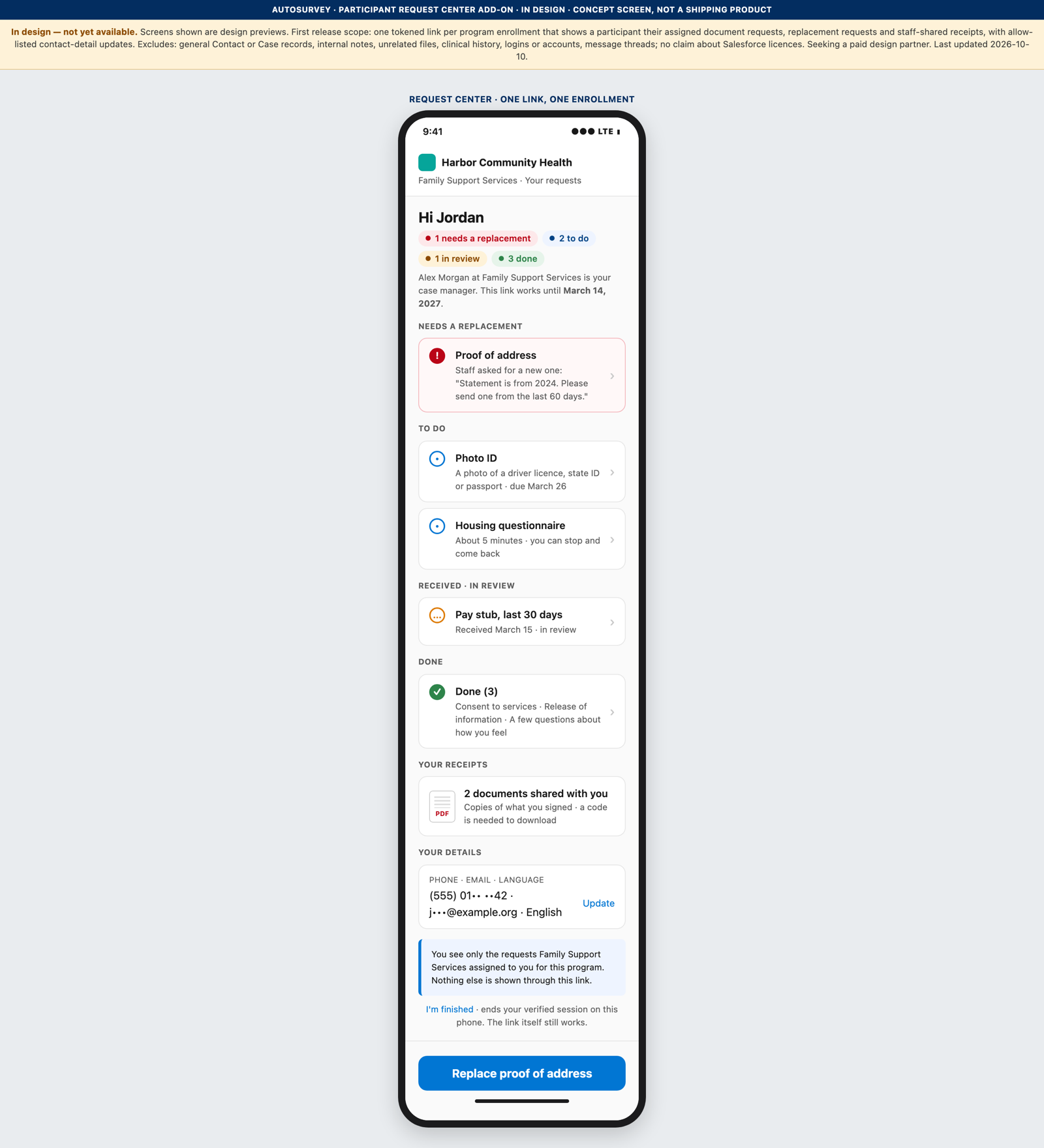
Design screen of a phone showing a participant's Request Center: a greeting, status pills for needs a replacement, to do, in review and done, grouped request items, a receipts card and a your-details card.

01 · The participant's phone

Only the requests assigned to this enrollment

In design. The participant opens one link and sees what needs attention first, then what is in review, then what is done. A request sent to the same person before the link existed is not on this page unless staff add it.

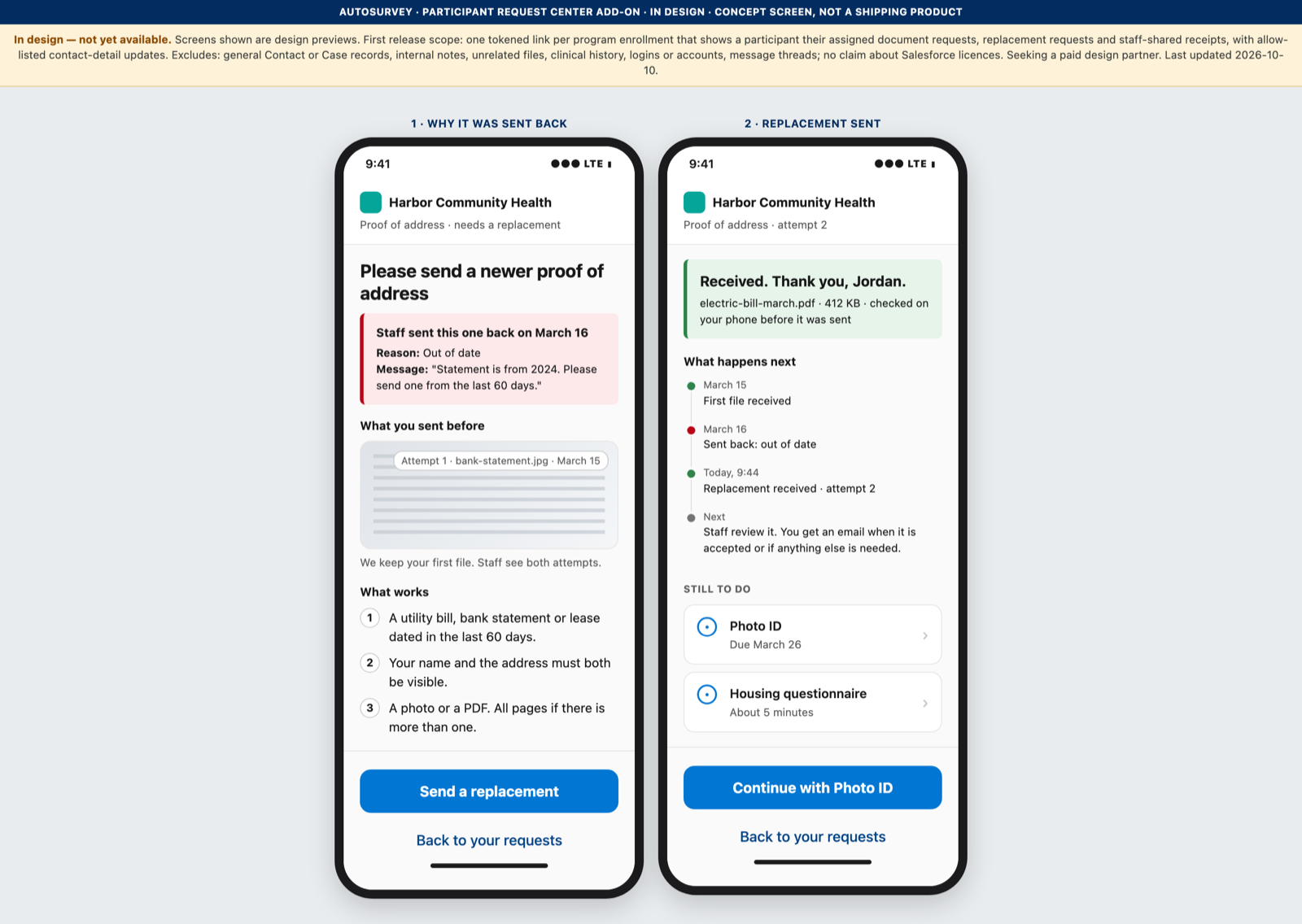
Design screen of two phone frames: a rejected proof-of-address item with the reason 'Out of date' and a send-a-replacement button, and the same item after attempt 2 was received, with the attempt history.

02 · Needs a replacement

The reason in plain words, and one step to fix it

In design. The staff rejection reason is shown on the item. The participant sends a replacement for that item only. The attempt history stays with the item, so a case manager and a participant see the same record.

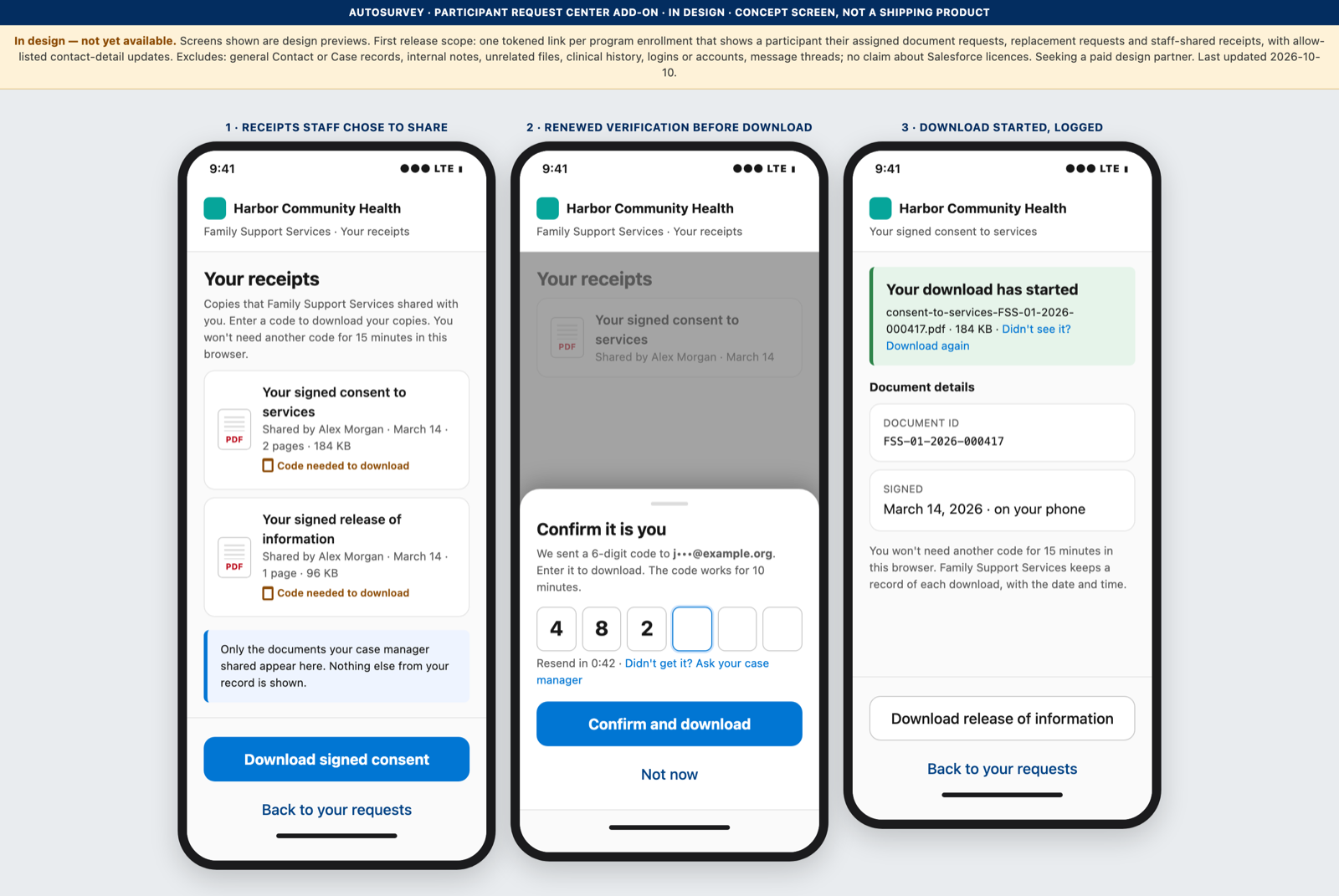
Design screen of three phone frames: a receipts list, a 'Confirm it is you' sheet asking for a six-digit code sent to a masked email, and a started download with its document ID and signing date.

03 · Shared receipts

A fresh code before a sensitive download

In design. Receipts that staff chose to share appear in one list. Every download asks for a one-time code sent to the email on file; one code covers 15 minutes in one browser. The page says "Your download has started" and shows the document ID and signing date.

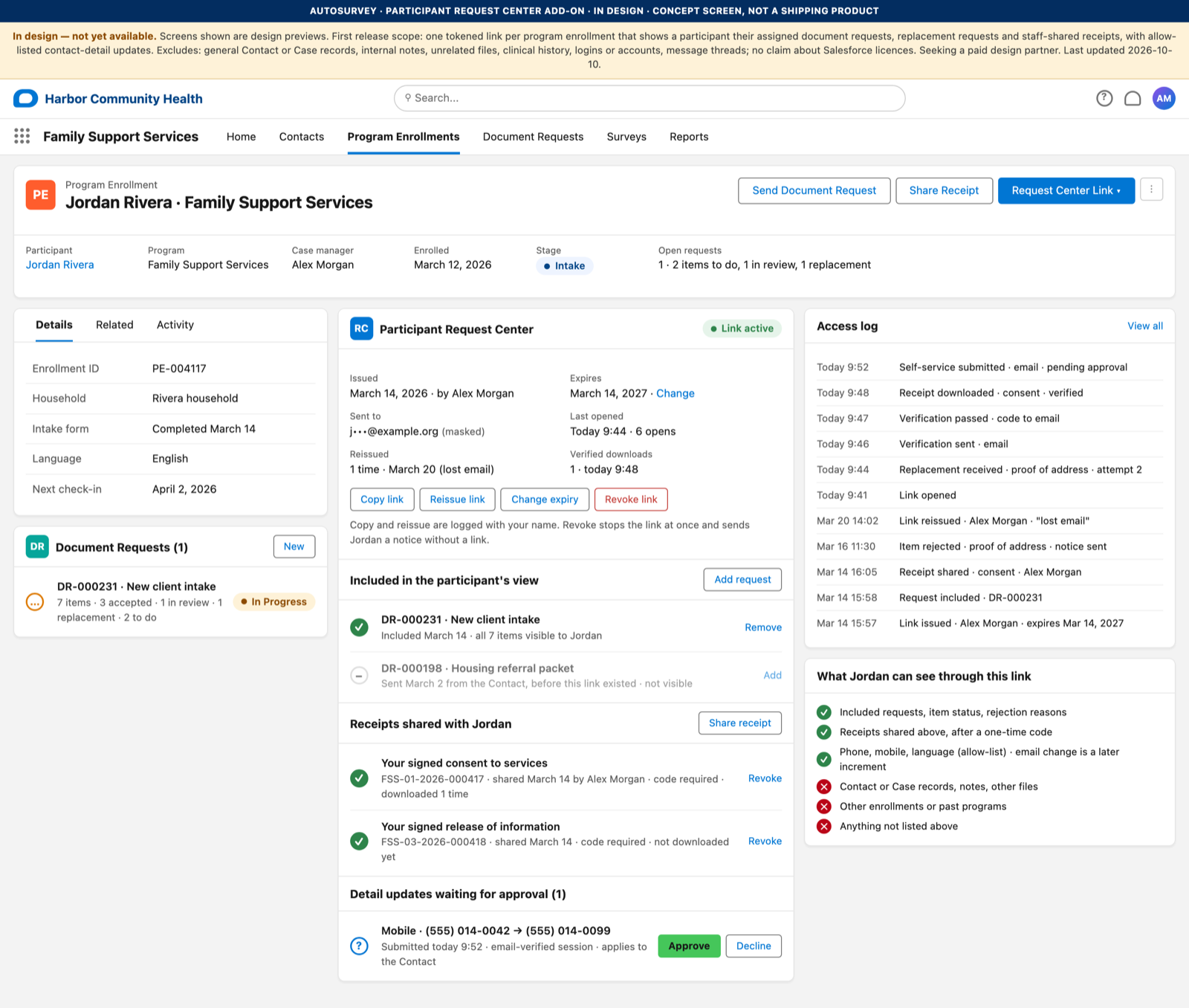
Design screen of a Salesforce Lightning record page for a program enrollment, with a Participant Request Center panel: issued and expiry dates, copy, reissue, change-expiry and revoke buttons, an inclusion list of requests, shared receipts, a pending detail update, an access log and a card listing what the participant can and cannot see.

04 · The case manager's view

Issue, reissue, change the expiry, or revoke, from the enrollment record

In design. The panel lists every request and receipt in the grant, with an Add and Remove control for each. An access log records each open, each code sent, each download and each change, with the staff name on every link action. A card on the right states what the link can and cannot show.

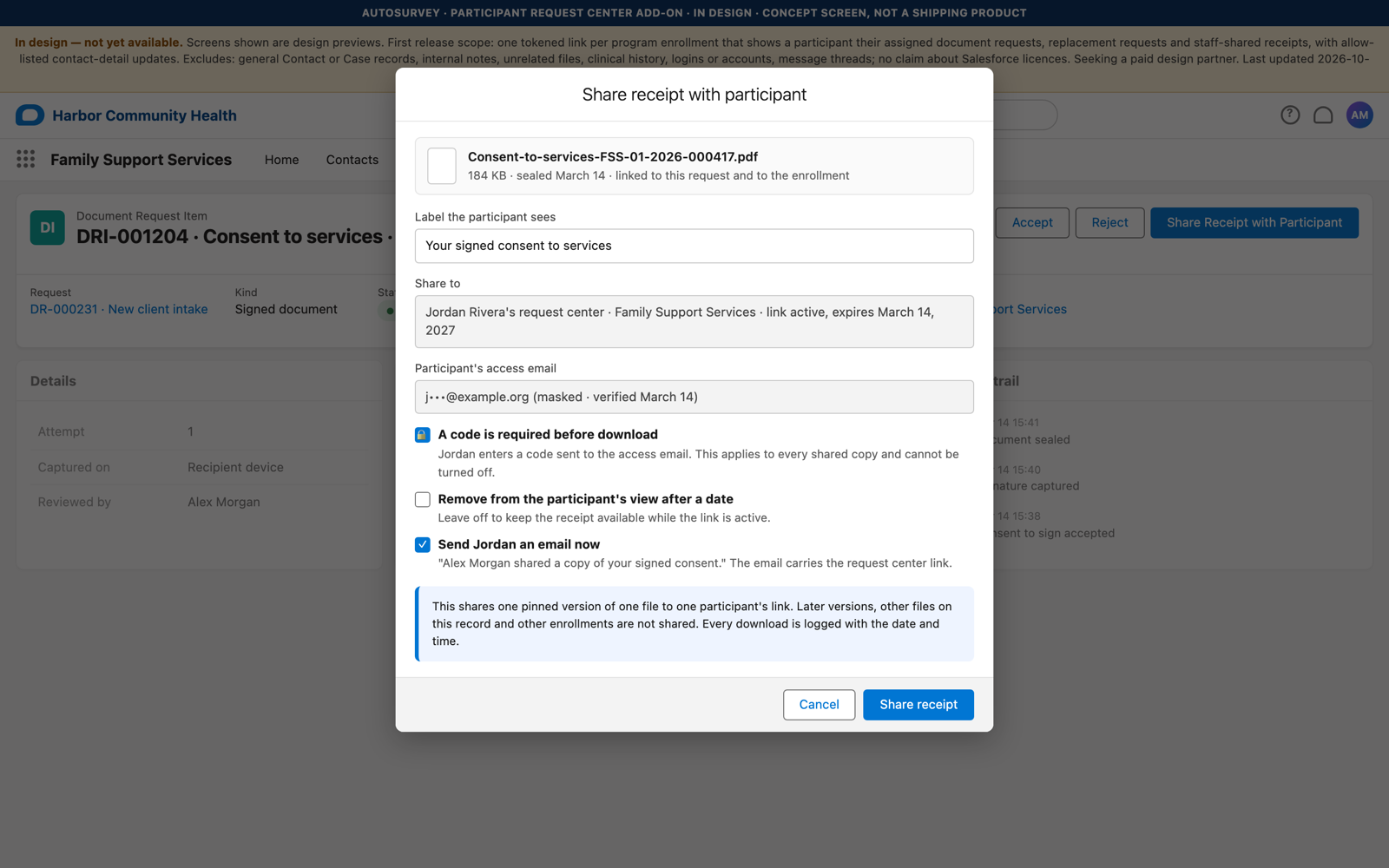
Design screen of a 'Share receipt with participant' dialog on a document request item: a label field, the share target, the masked access email, a require-code-before-download switch set on, an optional remove-after date, and a send-email switch.

05 · Share a receipt

Nothing is shared by default

In design. Staff share one receipt to one participant with a label and an optional remove-after date. A code before download is always required; there is no switch to turn it off. The share is an explicit record, with a name and a time, and can be revoked at any time.

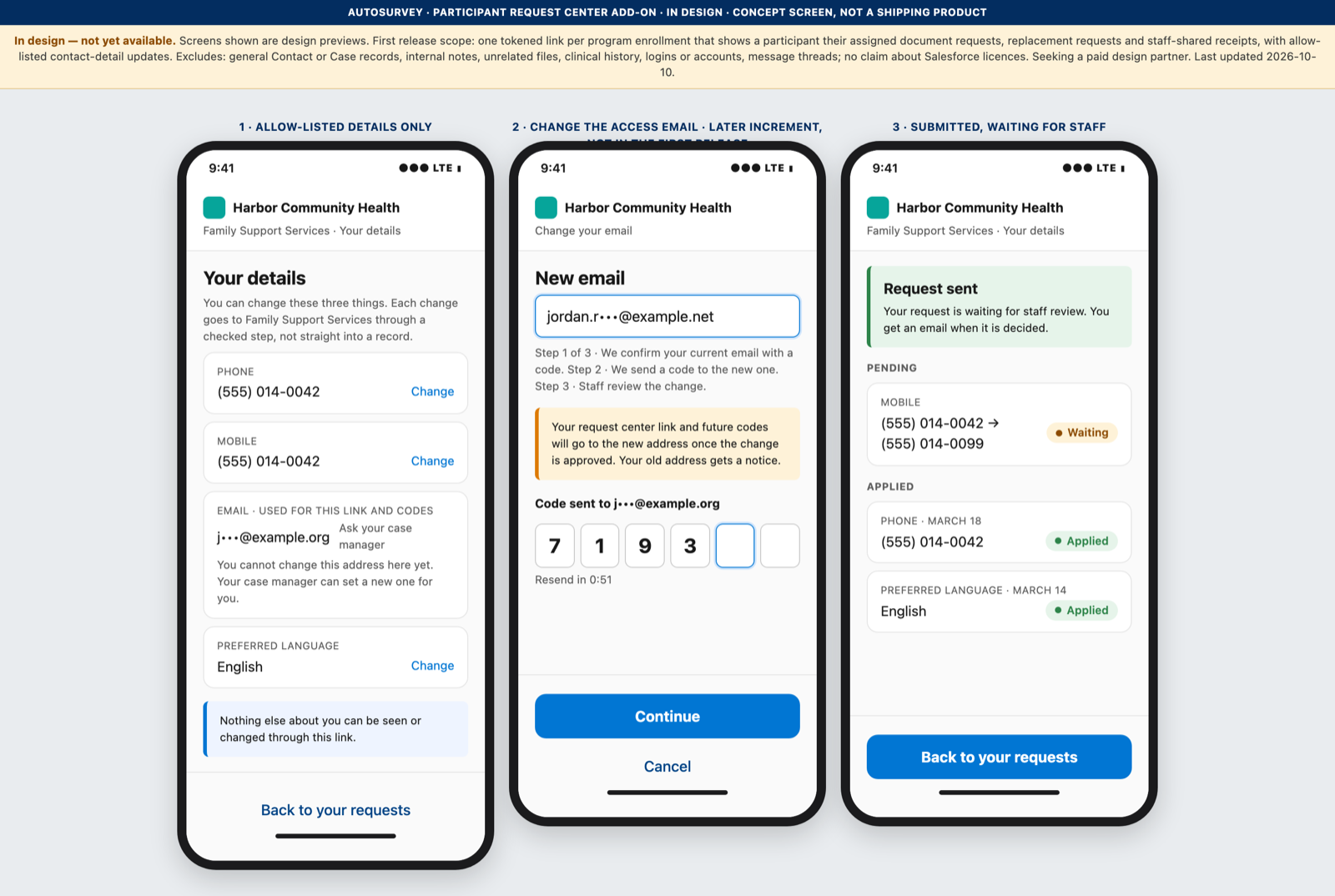
Design screen of three phone frames: an allow-listed 'Your details' form with phone, mobile and language; a change of the access email marked as a later increment; and the pending and applied states.

06 · Your details

A short allow-list of contact details

In design. The participant can update phone, mobile and preferred language. Each change is a checked, logged request that staff can review. A change to the access email, with its recovery path, is planned for the increment after the first release.

The first version

What V1 is designed to include

  • One tokened link per program enrollment, with an expiry date staff set, and issue, reissue, change-expiry and revoke controls on the record.
  • An explicit inclusion list: only the document requests staff add to the grant are visible. Older requests are not visible unless added.
  • Four participant-facing states: to do, in review, needs a replacement, done. A replacement reopens one item.
  • Staff-shared receipts, one at a time, with a code-before-download switch and an optional remove-after date.
  • A one-time code to the email on file before every download of a shared receipt; one code covers 15 minutes in one browser.
  • An allow-list of contact details the participant can update: phone, mobile, preferred language.
  • An access log on the enrollment, and an append-only event trail shared with the Document Request add-on.

Not in V1: message threads, appointments, general Contact or Case records, internal notes, unrelated files, clinical history, logins or accounts, SMS codes (email only at first), a self-service change of the access email (next increment), more than one enrollment per link.

Security posture

The link is the whole scope. The server checks every call against it.

  • Scope: one enrollment, the requests and receipts staff deliberately included, and the allow-listed detail fields. Nothing else is reachable through the link.
  • Server-side authorization: every read, upload, download and update is checked against the token's grant inside Salesforce. A record Id sent by the browser is never trusted.
  • Projection: the page receives only the fields it shows. Internal notes, reviewer names on rejections and staff-only fields never leave the org.
  • Expiry and revocation: a link expires on a set date, can be revoked at once, and a reissue invalidates the old link. A revoked or expired link shows a neutral page with no detail.
  • Renewed verification: a six-digit code, stored hashed, valid for ten minutes, with attempt and send limits, before every receipt download. The code verifies one browser session for 15 minutes, never the link itself.
  • Rate limits and audit: the guest limits already in AutoSurvey apply, downloads are capped per day, and every action lands in the hash-chained event trail.

This page describes a participant request workflow. It makes no statement about Salesforce licences or about any Salesforce product. The design records a written-clearance step with Salesforce's ISV licensing team as a gate before any such statement is made.

Where it stands

Designed. Not built. Seeking a paid design partner.

The design is complete, down to the data model, the token lifecycle, the authorization model and the effort by phase. We build it with one case-managed program that pays for the first version, shapes the screens, and runs it with real participants first.

If your intake team spends its afternoons chasing replacement documents by text message, we want to hear how many hours a month that costs. A design partner keeps the price they signed at.

The Request Center builds on the Document Request add-on, which is also under development. See how AutoSurvey handles guest access today.