AutoSurvey
Under development Every screen shows illustrative data from a fictional organization, not customer results.

Program Outcomes · add-on under development · proof of concept

Track client progress. Build funder reports in Salesforce.

Human-services programs give the same questionnaire at intake, at follow-up and at exit. Today the scores live in a PDF, a spreadsheet or a separate portal. Program Outcomes puts the instrument, the score and the trend on the Contact, Case or Program Engagement record in Salesforce, reports baseline against latest per program, and lets a Flow act when a score crosses a line your organization drew.

Built for behavioral health, family support, housing and care-management programs that already run on Salesforce. It runs on the AutoSurvey engine you already have.

One design partner wanted

Help shape your nonprofit's outcomes reporting

We look for one human-services nonprofit on Salesforce to help shape Program Outcomes, which is under development. We build around one instrument you give and one funder report you need.

  • You share: your organization, the instrument and the reporting headache. No client data.
  • Your time: a 30-minute first call. Pilot hours are agreed before you commit.
  • You get: a pilot at no cost with AutoSurvey included, an agreed exit, and publicity only if you want it.

What it does

Administer. Score. Act.

Three steps, repeated per encounter. Each one lands as a Salesforce record you can report on.

1

Administer, three ways

Staff read the items aloud and tap the answers. Or they hand the device to the client in an isolated respondent session, and staff sign in again to return. Or the client gets a link by email or text and answers at home. Or your own Screen Flow asks the items and calls one action to score them.

2

Score and band, by your protocol

The total, the subscale scores, the band, and the change since baseline and since the last visit are stamped on the administration record in the same save. One scorer serves all three modes. The bands are your organization's own approved protocol. The package ships none active.

3

Act in Flow

A threshold rule you write fires an event: a score crossed a line, a critical item was answered, or no change after N administrations. Your Flow opens the task, notifies the supervisor, or schedules the next administration. Each event records whether someone acknowledged it. Two Flow templates ship as a starting point.

Why it is useful

One record of truth for the score. No portal, no re-keying. Scheduled and unacknowledged follow-ups are tracked.

The trend is on the record

A score-over-time chart on the Contact, Case or Program Engagement page, shaded with your bands and marked at each administration. A case manager sees intake to today in one glance, without opening a second system.

Follow-up that does not depend on memory

A schedule per client sends the next link or reminds the worker. A threshold event reaches your Flow the moment the record saves. The follow-up protocol runs the same way for every client, on every shift.

The funder report is a Salesforce report

Baseline versus latest, the shift between bands, completion by mode, and the count of critical-item events, per program and per period. Built from the same records, exportable, and reproducible next quarter.

Your protocol, under your version control

Bands and threshold rules are records, with an approver, an effective date and a change log. An active protocol is read-only; a change is a new draft. Published cut-points can be loaded as a starting point. Your clinical lead approves them before any rule fires. Nothing on this page is a clinical claim.

The screens

What Program Outcomes will look like

Proof-of-concept screens, rendered in the Salesforce Lightning style. The funder report comes first, because that is the deliverable; the record, the device and the protocol follow. Every organization, person, approver and score is illustrative data, not a customer result. Each screen carries a ribbon that says so.

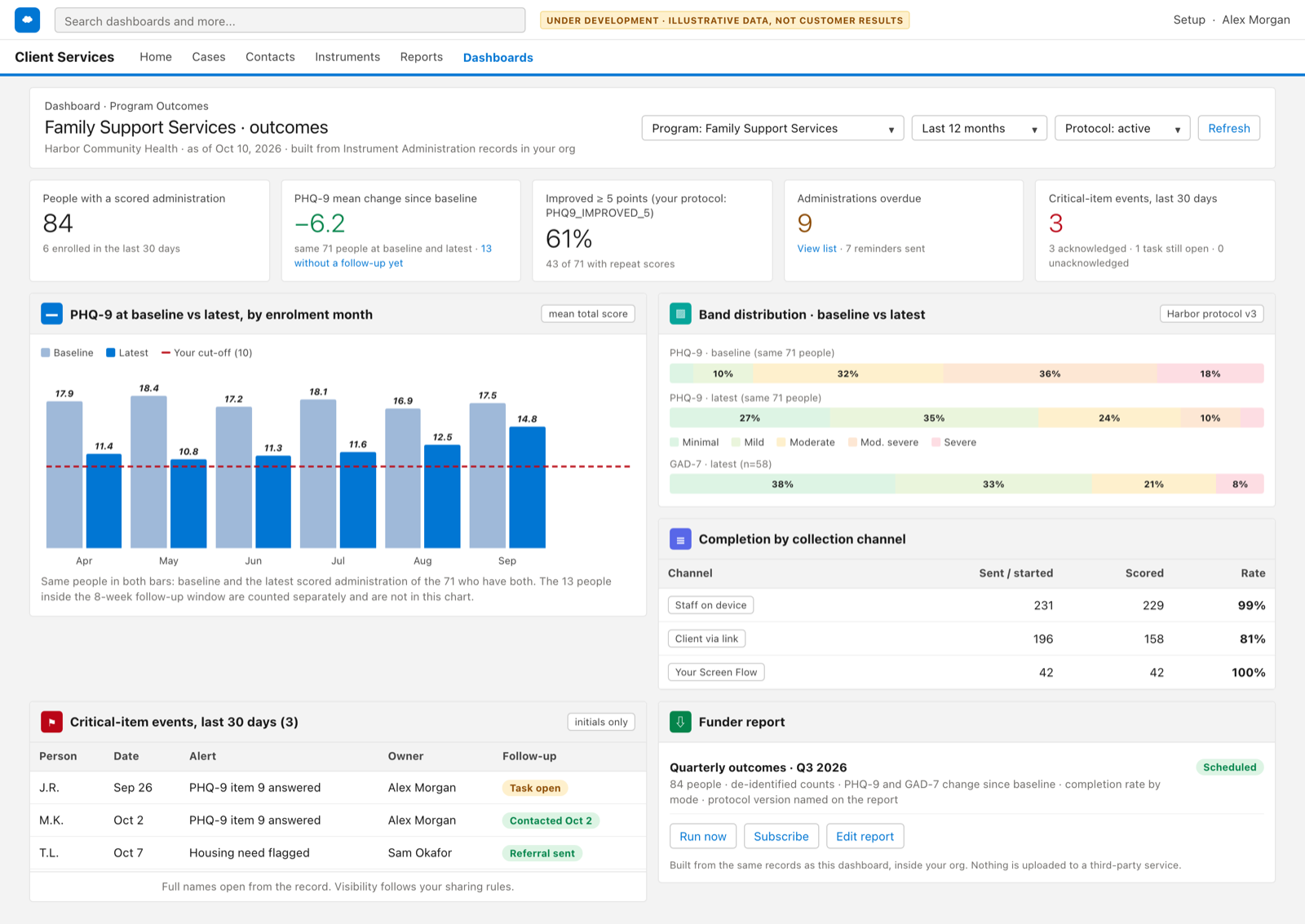
Proof-of-concept screen of the program outcomes dashboard: tiles for clients administered, completion rate, improved since baseline and critical-item events, a baseline-versus-latest chart with the organization's cut-off, band distribution at intake and latest, completion by mode, and a funder report panel. Illustrative data, fictional organization.

01 · Program outcomes dashboard

Baseline versus latest, per program, ready for the funder

Under development. Baseline against latest for the same people, with those still inside the follow-up window counted separately. Completion by collection channel, and critical-item alerts with their acknowledgement. The funder export is the same data. Illustrative data.

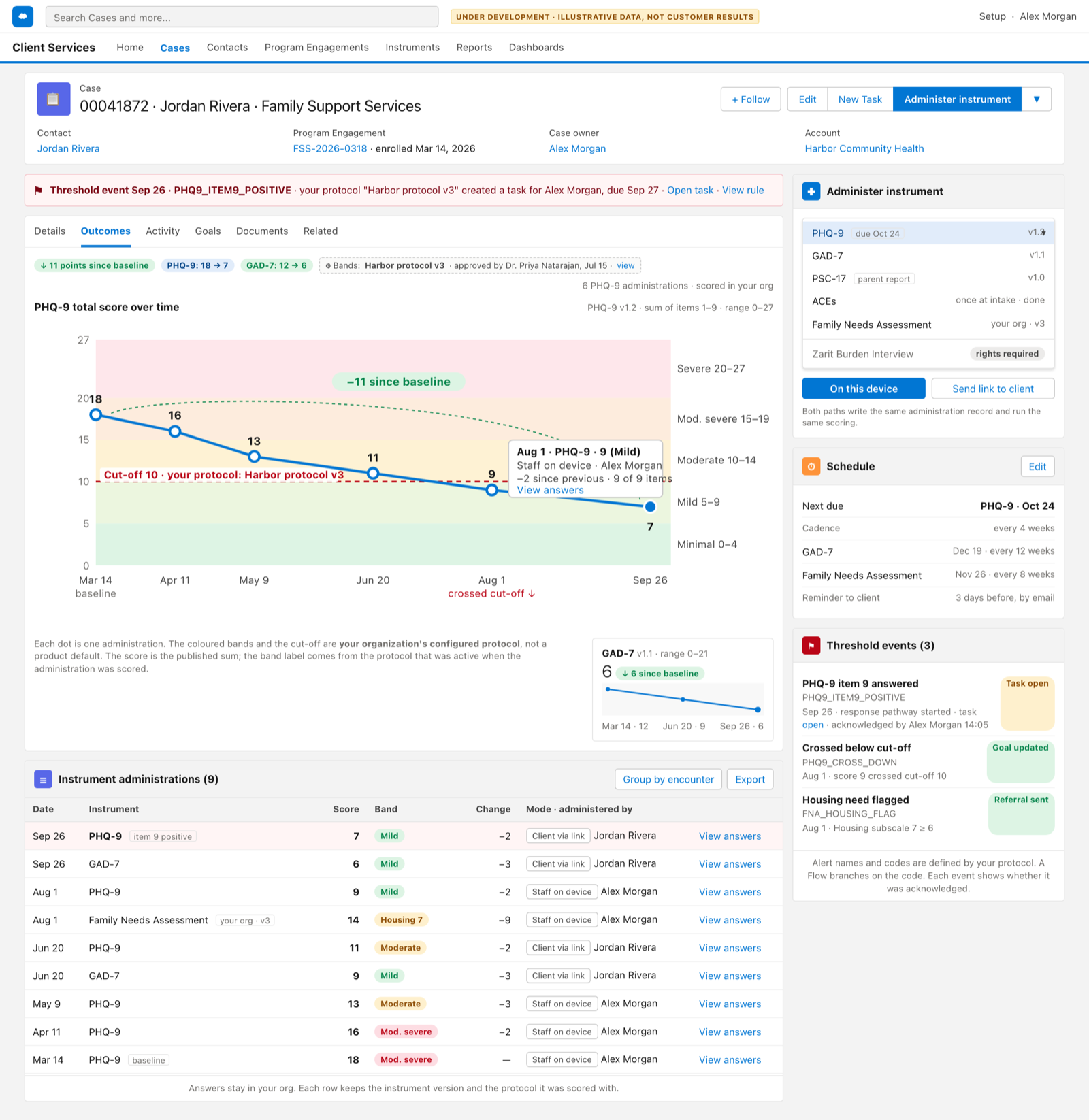
Proof-of-concept screen of a Case record Outcomes tab in Salesforce Lightning style: a PHQ-9 score trend over the organization's severity bands with its cut-off line, a GAD-7 sparkline, a table of administrations, an administer panel, a schedule and recent threshold events. Illustrative data, fictional organization.

02 · Outcomes on the Case

Intake to today, on one tab

Under development. The PHQ-9 trend over the bands this fictional organization approved, with its own cut-off line. Each point is an administration, with the channel and the worker. The next administration is scheduled, and each alert this record raised shows who acknowledged it. Illustrative data.

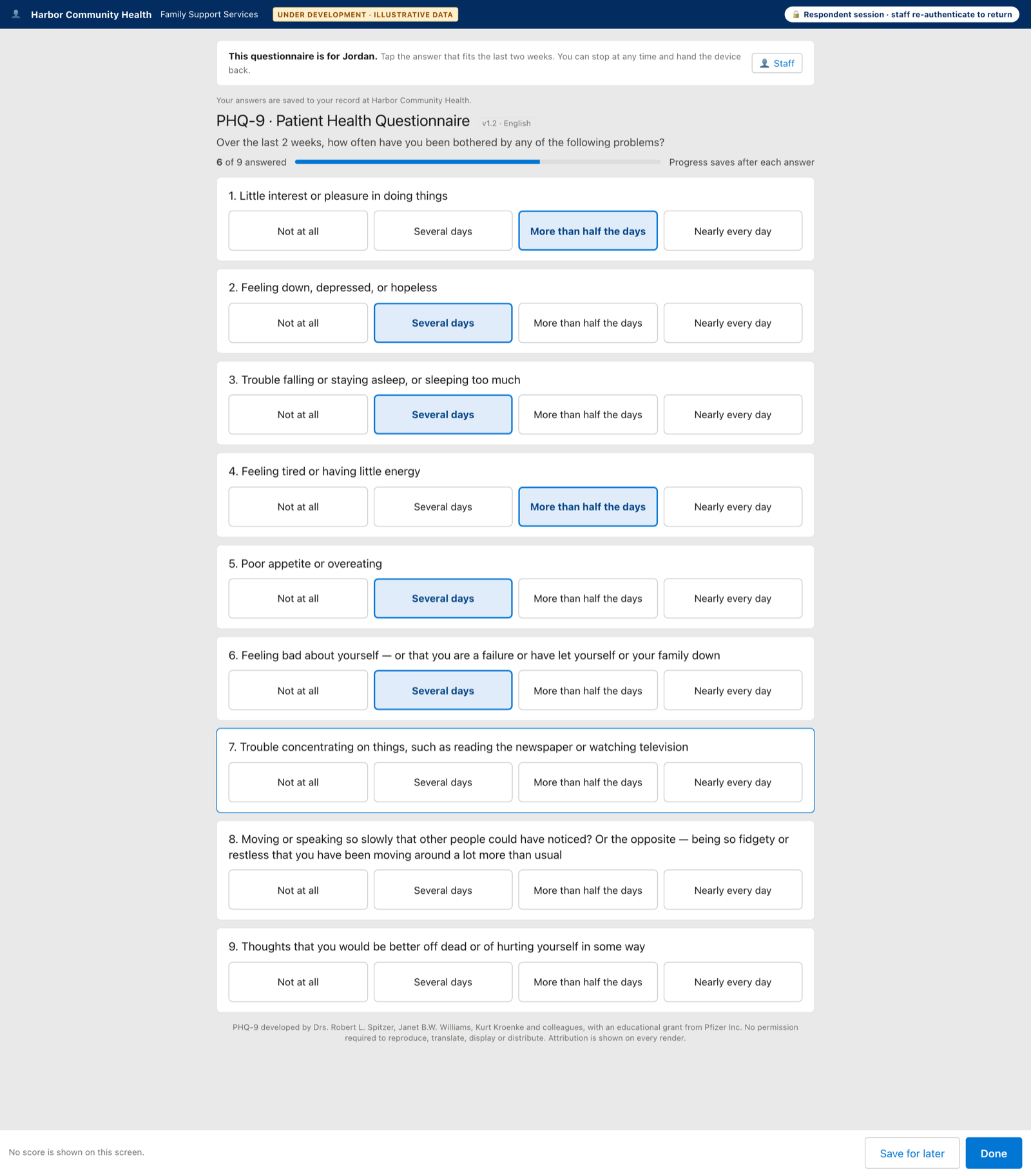
Proof-of-concept screen of an instrument on a tablet in a respondent session: the organization name, a note that staff re-authenticate to return, the PHQ-9 items with their developer attribution, and no score on the screen. Illustrative data, fictional organization.

03 · Administer on a device

Read it aloud, or hand the device over in a respondent session

Under development. The worker starts the instrument from the record. Hand-the-device opens an isolated respondent session with no record context and no running score; staff re-authenticate to return. The answers save to the same record either way. Illustrative data.

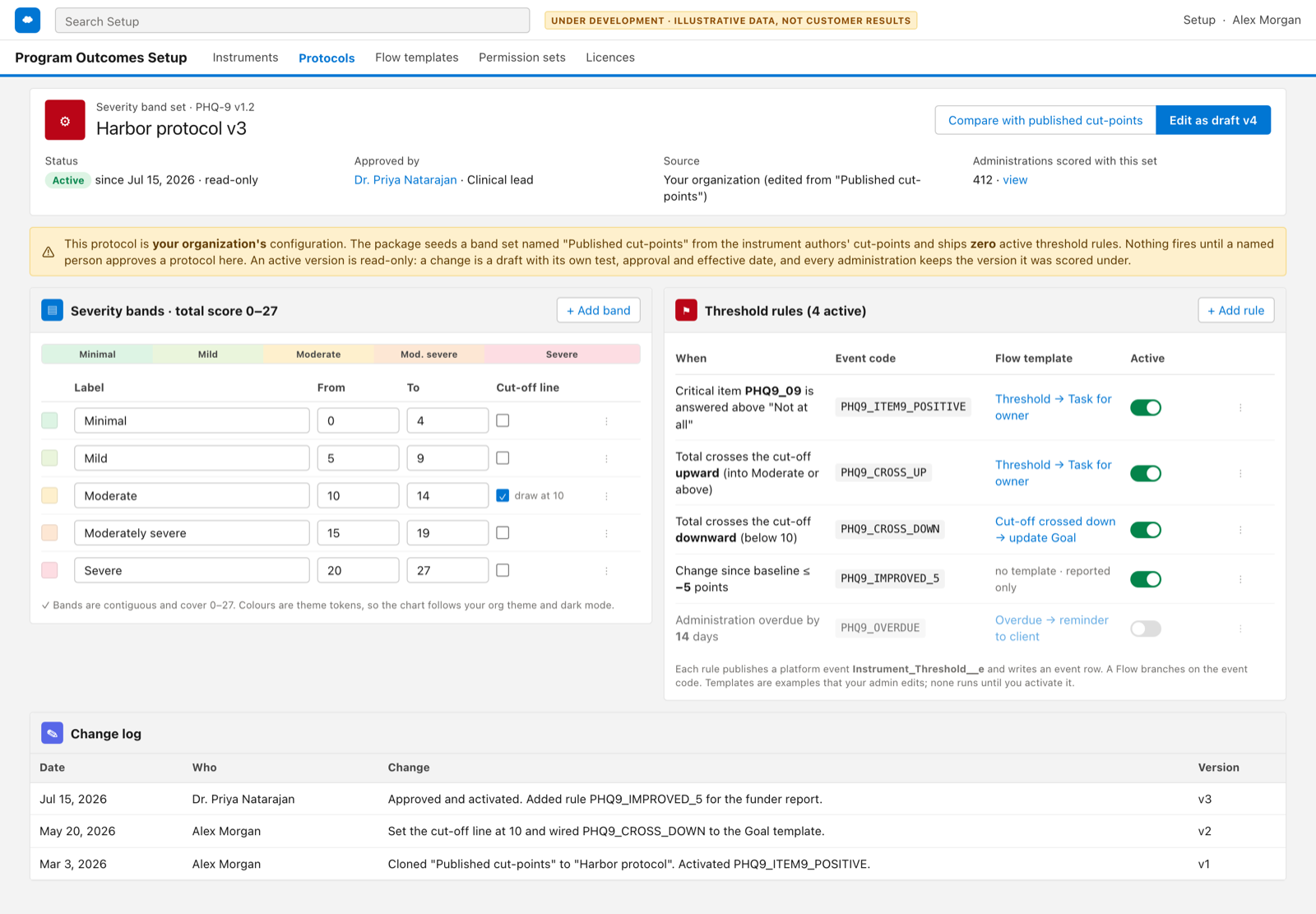
Proof-of-concept screen of the threshold protocol page: a band set editor with the organization's approved cut-points, threshold rules with event codes and the Flow template each one starts, and a change log with the approver. Illustrative data, fictional organization.

04 · Threshold protocol

The bands and the rules are yours, with an approver and a date

Under development. A band set is a short table your clinical lead approves, read-only once active. A threshold rule names the alert it raises and the Flow that listens. A rule on a critical item needs your recorded response pathway first. Every change is logged. The package ships no active rule. Illustrative data.

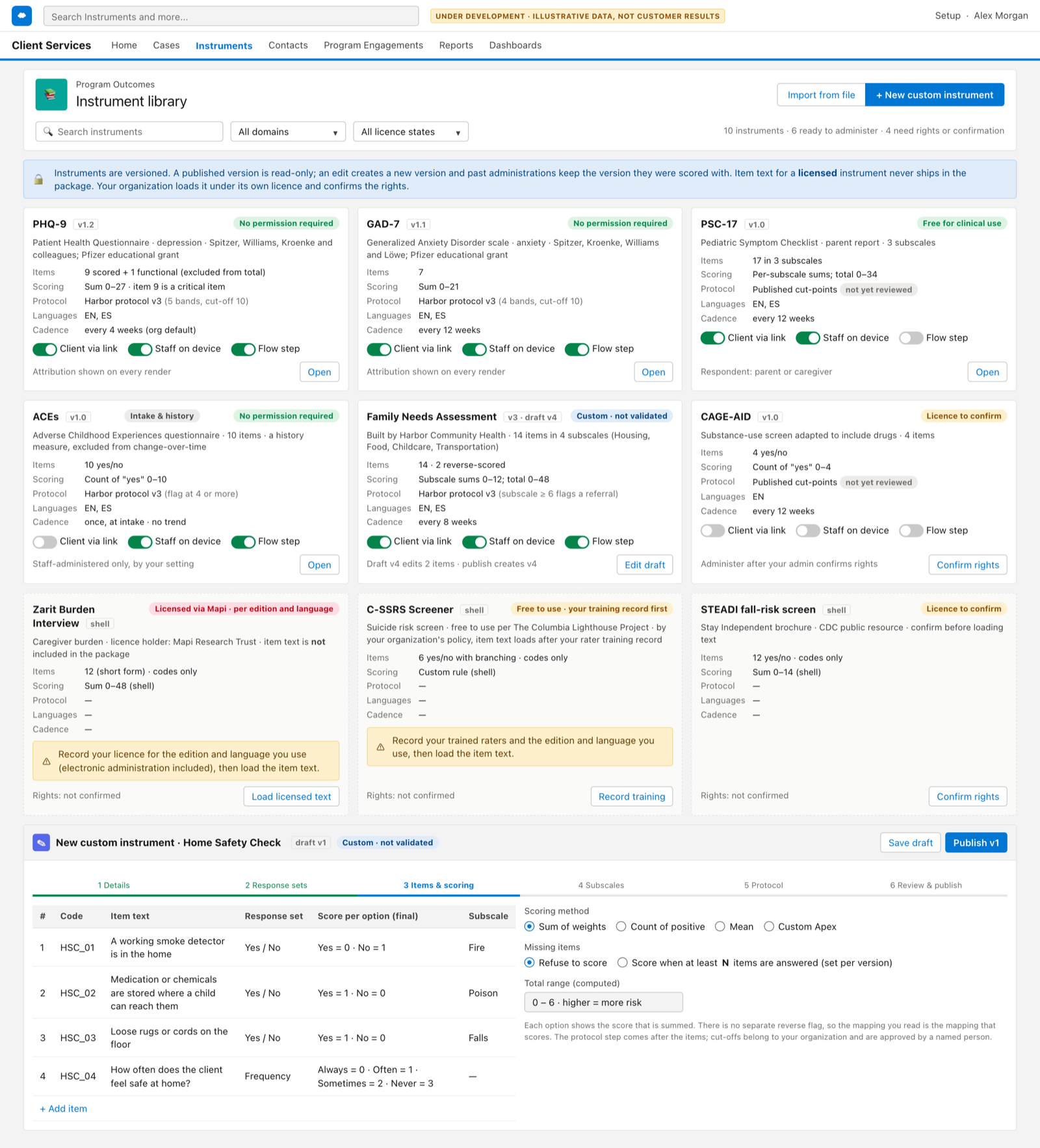
Proof-of-concept screen of the instrument library: cards for PHQ-9, GAD-7, PSC-17 and ACEs with a licence status, text-free shells for licensed instruments, and a custom-instrument builder with reverse-scored items. Illustrative data, fictional organization.

05 · Instrument library

Free instruments with text. Licensed ones as shells, in a later version.

Under development. Each instrument is versioned, with its items, the score per option, subscales and scoring method. A history measure such as ACEs is scored once and kept out of the trend. A custom instrument, like a home-safety check, is built the same way and is labelled custom, not validated. Illustrative data.

For your Salesforce admin · the first version

What V1 will include

  • An instrument library with versions, items, weighted options, reverse-scored items, subscales, and sum, count, mean or custom scoring.
  • Three administration modes: staff device with an isolated respondent session for hand-the-device, tokened link, and your own Screen Flow through two invocable actions, one to score and one to finalize.
  • An administration record on Contact, Case or Program Engagement with total, subscales, band, the measurement series it belongs to, and change since baseline and since previous.
  • Severity band sets and threshold rules as records your organization approves, with a change log. None active at install.
  • A platform event per threshold rule with an acknowledgement status, a list of unacknowledged follow-ups, and two Flow templates: open a task, and schedule the next administration.
  • A score-over-time component for the record page, and a program outcomes dashboard with a funder export.
  • Five permission sets: administer, view, protocol admin, instrument admin, and guest for the tokened link.

Kept for a later version: licensed instrument shells, custom Apex scoring, encounter records, a rater-certification gate, instrument text translations, and norm-referenced scores.

Instruments and licences

Free instruments ship with their text. Licensed ones come later, as shells.

  • FreePHQ-9, GAD-7, PSC-17. Instruments that need no permission ship with their item text and their developers' attribution on every screen. ACEs ships as an intake and history measure, scored once.
  • ShellLicensed instruments, later version. The scoring structure ships. The item text does not. Your organization records its licence for the edition and language it uses, attaches the evidence, then enters the text.
  • YoursCustom instruments. Your own checklist or questionnaire, built in the same library with the same scoring and trend, and labelled custom, not validated.
  • Severity bands and cut-points are your organization's configured protocol. The add-on does not diagnose, does not classify risk, and does not recommend treatment. An instrument with a critical item cannot be administered until your response pathway is recorded.
  • Answers live in the same objects as every other AutoSurvey response, so one erasure path serves both. Scores purge with the answers they came from.

Where it stands

A proof of concept. We finish it with one design partner.

The proof of concept is complete, down to the data model, the screens and the effort by phase. We start the build when one organization names an owner, the report its funder asks for, the instruments it gives, and a pilot it will run with Salesforce as the system of record for the scores. No customer uses Program Outcomes yet. No number on this page is a customer result.

If that is you, become the design partner. Program Outcomes is one of two add-ons under development; the other is the Fraud & Quality Shield, which checks the quality of every response before it counts.

What costs what

  • AutoSurvey: the published price, every user and every response.
  • Fraud & Quality Shield: under development; included in the AutoSurvey price when it ships.
  • Program Outcomes: under development; a separate price, not yet set. The design partner pays nothing for the pilot.

You work with Erik Rogers, the founder of Mindshare Studio LLC, directly: support@mindsharestudio.com.

AutoSurvey already scores every survey and stores each response as a Salesforce record. Program Outcomes adds the instrument library, the bands, the trend and the threshold events on top. See Reporting.