AutoSurvey

AutoSurvey · surveys that run inside Salesforce

Write a survey once. Offer it in up to 34 languages. Review the texts first.

AutoSurvey is a survey app that runs inside your Salesforce org. With multilingual surveys, you write a survey once and offer it in up to 34 languages. Your org’s AI provider drafts each translation. A person on your team reviews the texts. The release dialog shows how many texts still need review. A respondent can change the language during the survey and keeps every answer.

Send one of your surveys to Erik Rogers, the founder. He shows it to you in the languages you use, from the 34 that AutoSurvey offers.

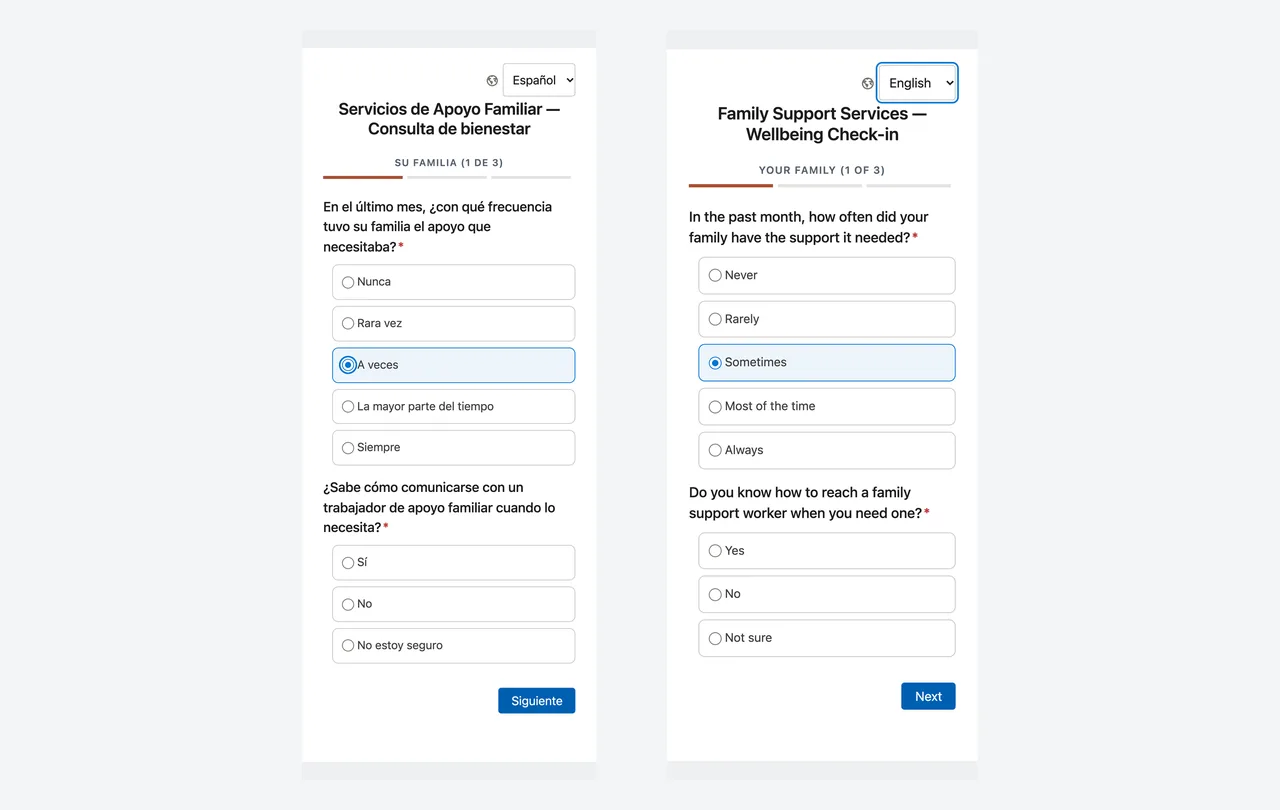
Two phone screens of the same survey question side by side. The left phone shows the question in Spanish with the choice A veces selected. The right phone shows the same question in English with the choice Sometimes selected. Each phone has a globe icon and a language list at the top.

The same screen before and after the respondent switched from Spanish to English. The selected choice stayed selected.

See your own survey in your languages

Send Erik one of your surveys: a link from GetFeedback, SurveyMonkey, Typeform, Google Forms or Salesforce Surveys, or a copy of the questions. Tell him the languages you use. He shows you the survey in those languages, as a respondent sees it, and the review panel your team uses.

AutoSurvey offers 34 left-to-right languages. AutoSurvey does not offer Arabic or Hebrew.

Reply to Erik’s email, or use the button to start a new email to him.

How it works

Add a language. Review the texts. Release. That is the whole workflow.

1

Add a language

Pick a language in the Languages card. AutoSurvey sends every respondent-facing text to your AI provider and stores the result as a translation. About ten seconds per language for a short survey.

2

A person reviews

Each text shows its origin and its review mark. Edit a text in place. Mark it reviewed. To edit many texts, use a CSV file or the survey's Google Sheet. Review the legal text before release.

3

Release

The release dialog lists each language with its counts and asks a named person to confirm the legal text. The text cannot change in a released survey version. Later edits wait for the next release.

4

Respondents answer

The link, the invitation, the browser or the default picks the language. A globe control lets the respondent change it. AutoSurvey records the language on the response.

Why it matters

One survey to maintain. One set of results. Tools to review translations.

No copies of the form

Separate forms for each language can contain different questions, and they split the results. Here there is one survey, one release and one set of responses. A choice stores the same value in every language, so a score never changes with the label.

AI drafts, people decide

The AI gives you a full draft in seconds. Your team reviews it, keeps brand words as they are, and confirms the legal text by name. The release records who confirmed and when.

Prepared for review

Your team can check each translation, edit it, and mark it reviewed. A respondent can change language during the survey and keeps every answer.

The screens

What it looks like

Real screenshots from a test org on 2026-10-10. The survey and the organization are fictional. The Spanish and French texts are the AI's own output, before any edit by a person.

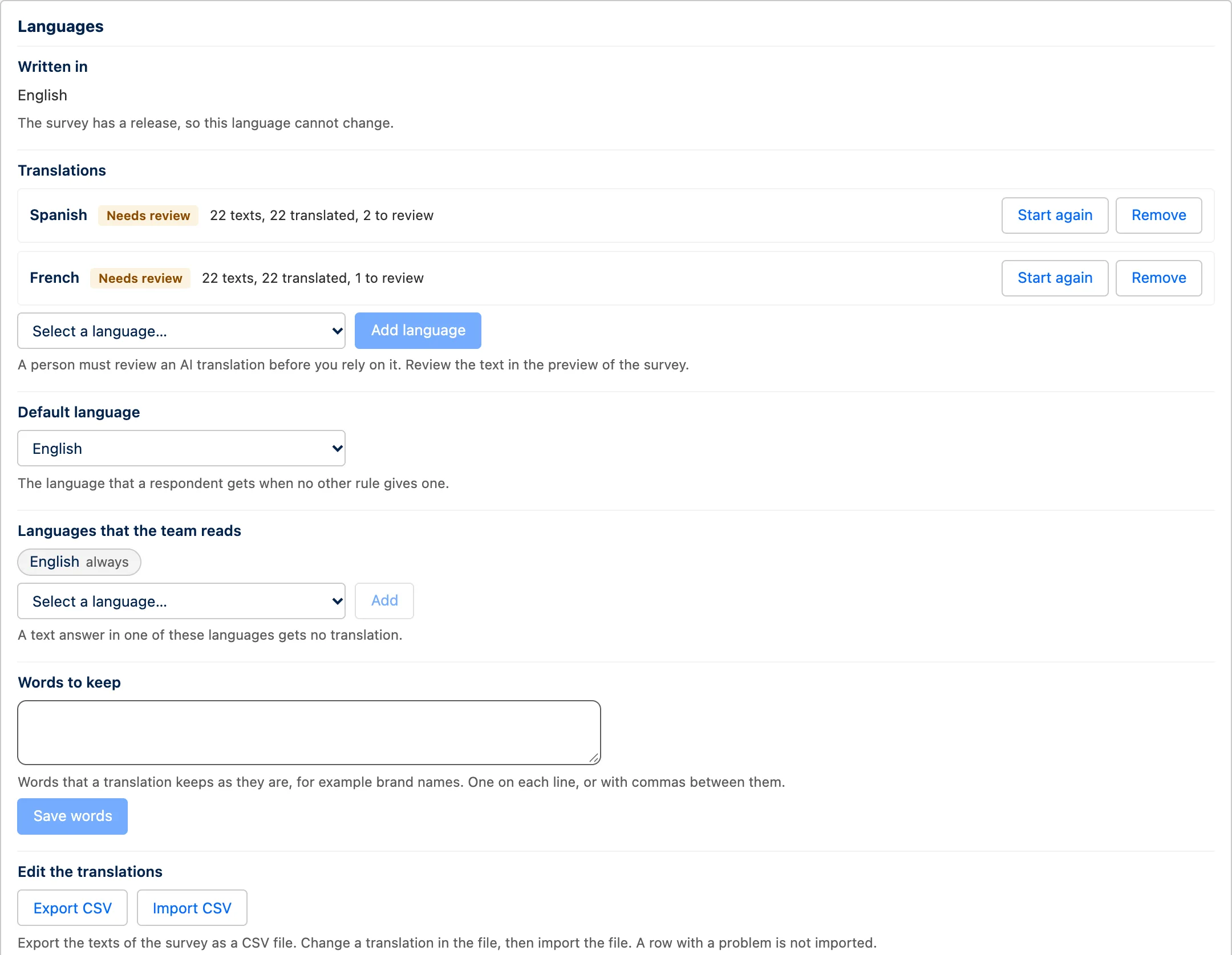
The Languages card of a survey. Written in: English. Translations: Spanish, Needs review, 22 texts, 22 translated, 2 to review. French, Needs review, 22 texts, 22 translated, 1 to review. A list to add a language. A Default language list set to English. Languages that the team reads: English. A Words to keep box. Export CSV and Import CSV buttons.

Open full-size screenshot

01 · The Languages card

Add a language from a list of 34

Pick a language and click Add. The card shows each language with its status and its counts. Use the same card to set the default language and enter words that must not change. Export the texts as CSV, correct them, and import the file.
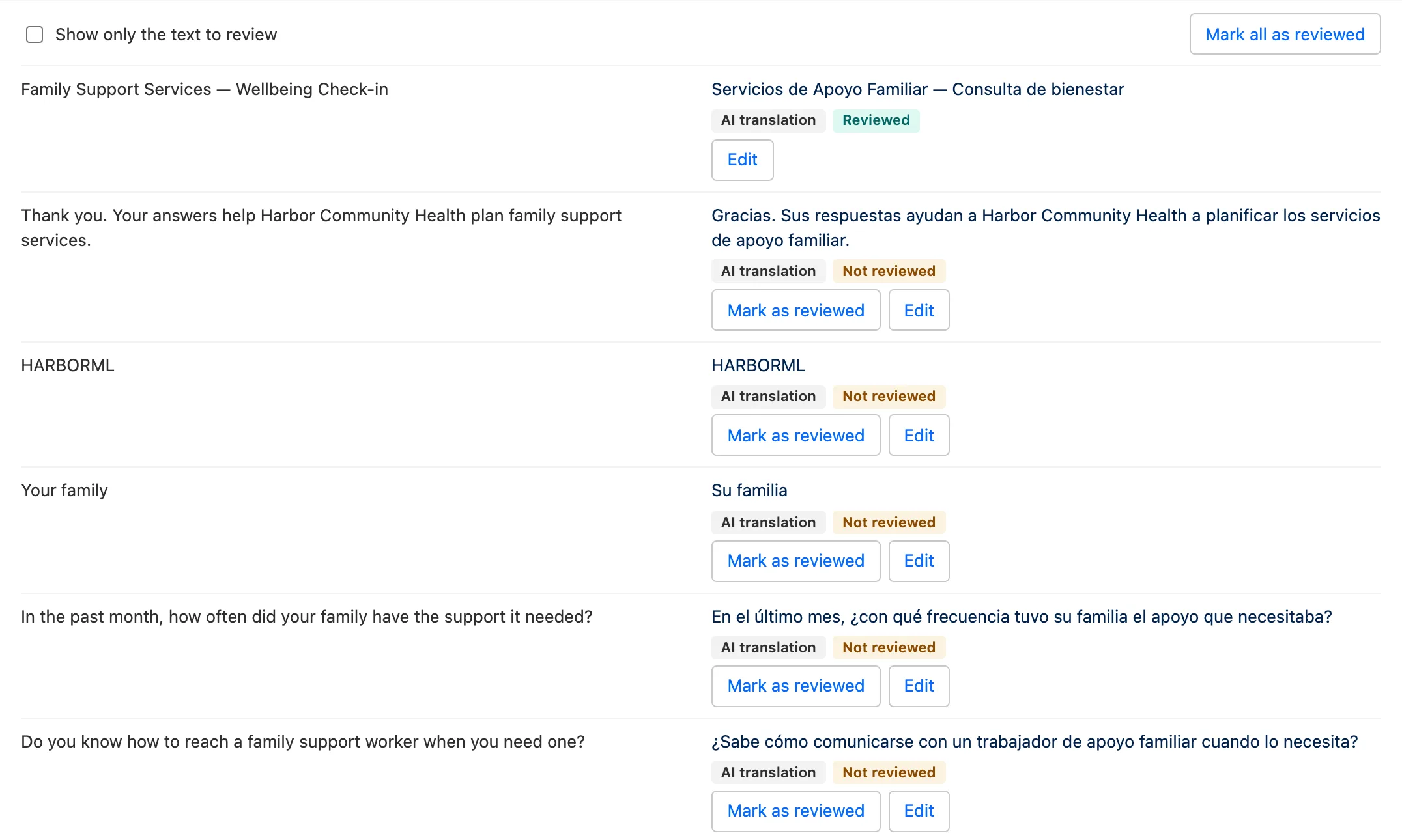
The translation review panel. The left column shows the English source text of each row. The right column shows the Spanish translation with two badges, AI translation and Not reviewed, and the buttons Mark as reviewed and Edit. The first row, the survey title, is marked Reviewed.

Open full-size screenshot

02 · The review panel

Source on the left, translation on the right, one mark per text

Each text carries its origin, such as AI translation or Changed by a person, and its review mark. Mark one text, or mark all. Edit a text in place. A filter shows only the texts that still need review. If the source text changes later, the mark changes to Source text changed.

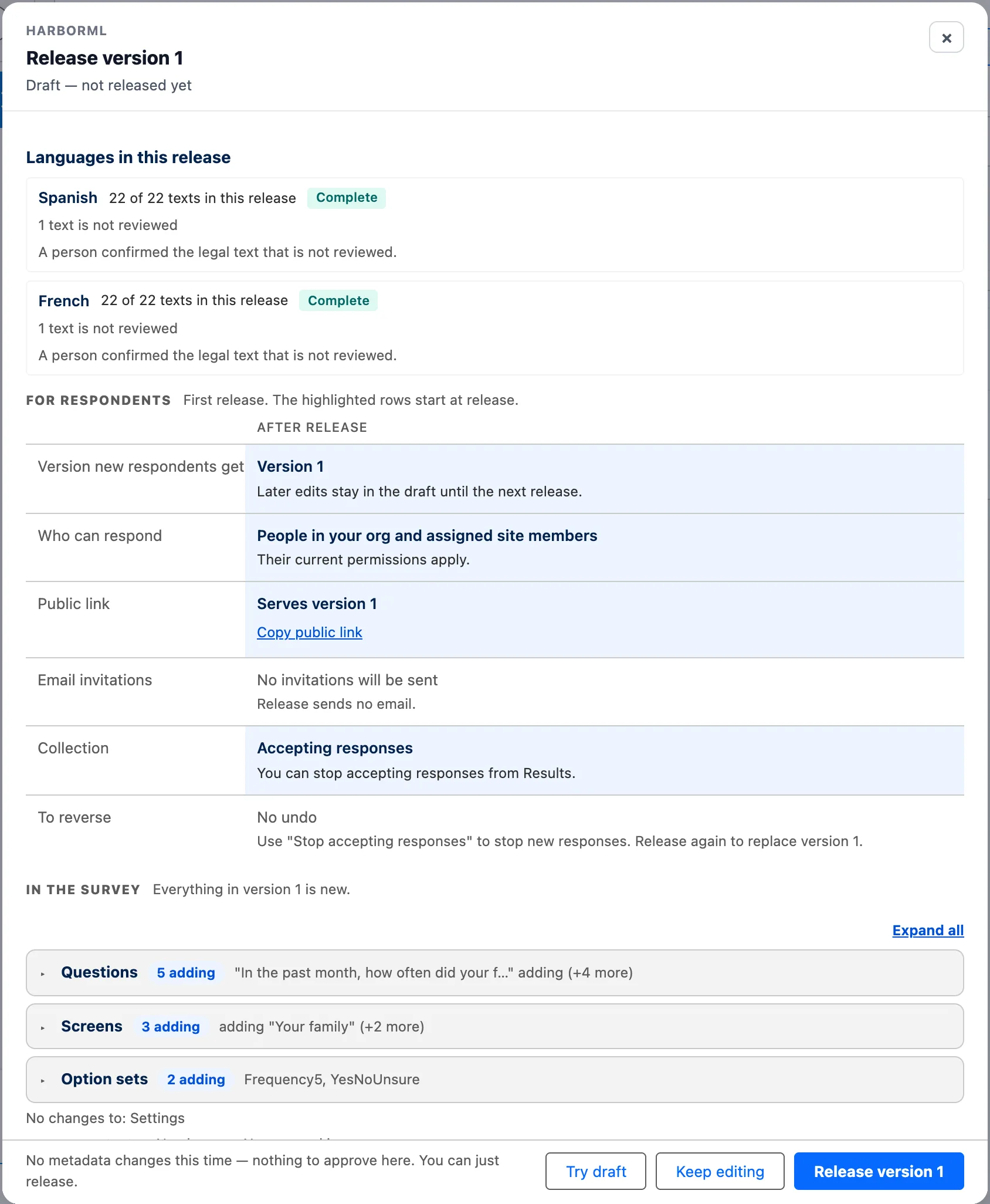
03 · The release dialog

The release names its languages and locks their texts

The dialog shows how many texts each language has and how many are not reviewed. The legal text, such as the consent sentence, must be reviewed or confirmed by a named person before the release goes out. A language that is not complete is still permitted. A respondent then sees the source text for the missing lines.

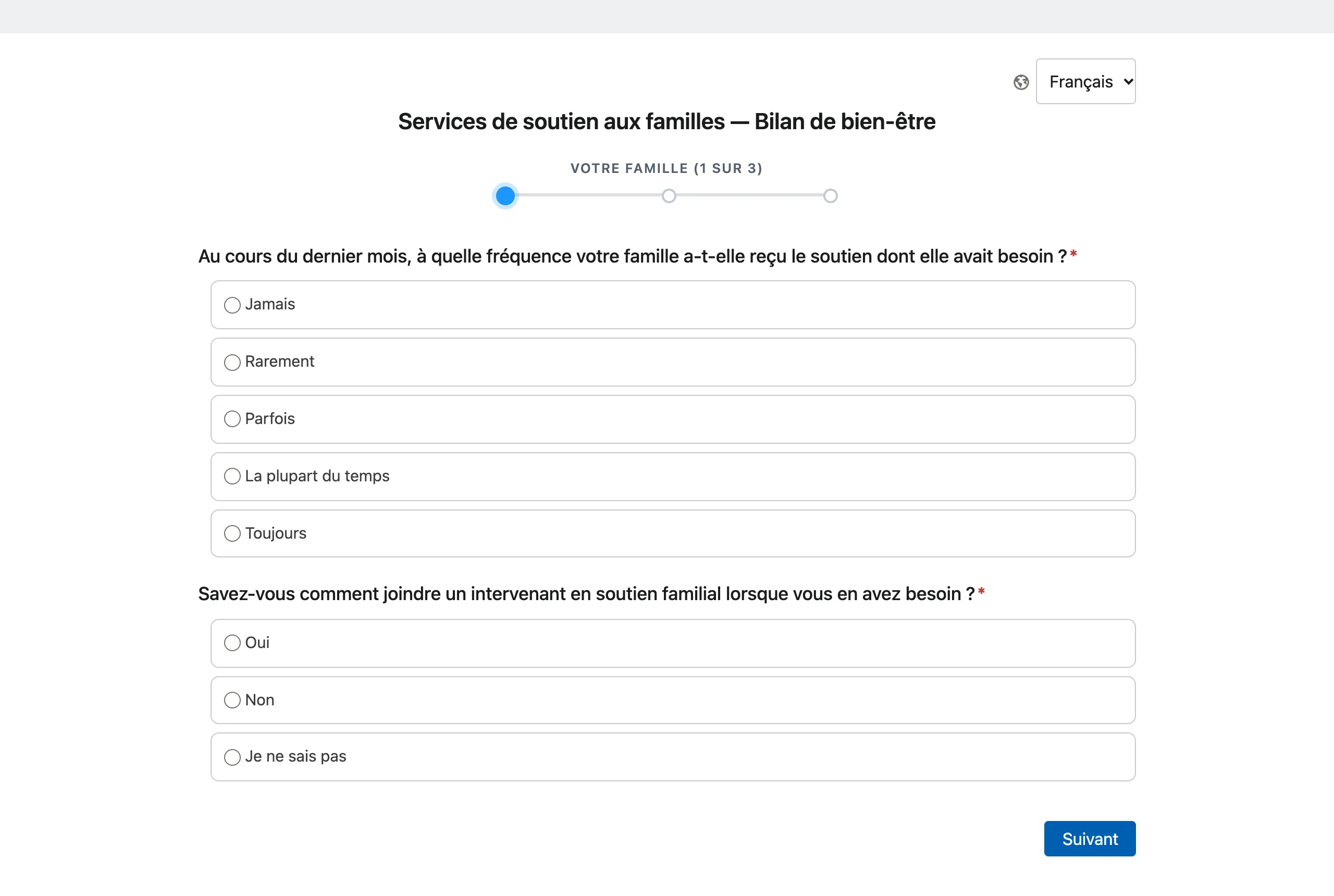
The survey on a desktop screen in French. A globe icon and a language list set to Français at the top right. The title Services de soutien aux familles, Bilan de bien-être. A progress bar. Two questions with their choices in French and a Suivant button.

Open full-size screenshot

04 · The survey, in French this time

Every respondent-facing text, including the buttons and the errors

The link, the invitation, the browser language or the survey's default picks the first language. The globe control changes it at any point. A regional language such as Canadian French falls back to French. The language is saved on the response when the respondent submits the survey.

Erik Rogers, founder of AutoSurvey

You work with me

Erik Rogers, founder and lead engineer, Mindshare Studio

I’ve worked as a Salesforce developer and architect since 2008. I built AutoSurvey myself, from start to finish. AutoSurvey is a managed package, and your survey data stays in your Salesforce org.

LinkedIn · erik@mindsharestudio.com

For Salesforce admins: what it does and does not do Languages, translation, review, release and emails.

What it does

  • 34 left-to-right languages, from Spanish, French and Vietnamese to Polish, Korean and Ukrainian. Several languages on one survey.
  • AI translation of every respondent-facing text: title, screens, questions, choices, help text, consent text, the thank-you message, and the fixed texts such as buttons and errors.
  • Uses the AI provider your org already set up for AutoSurvey: the hosted service or your own key.
  • Review in the app, in a CSV file, or in the survey's Google Sheet. Origin and review mark on every text. Words to keep for brand names.
  • Legal text confirmed by a named person at release. The texts cannot change in a released version. A later edit waits for the next release.
  • Invitation and reminder emails in each language, with a per-language text on the send dialog and a Language input on the Flow send action. A recipient language on Contact, Lead and User.

What it does not do

  • Right-to-left languages. AutoSurvey does not offer Arabic or Hebrew.
  • Translated admin screens. The builder, the review panel and Setup stay in English.
  • Translated reports. Reports and dashboards show the source language. The response language is a field you can group by.
  • Review of the fixed texts by a native speaker. The buttons and errors are AI-written. Your team can correct them like any other text.
  • Licensed instrument text. AutoSurvey ships no instrument text in any language. Your organization enters a translation it holds the right to use.
  • An AI translation is a draft until a person marks it reviewed. The card says so, and the release dialog shows how many texts still need review.

AutoSurvey publishes survey versions whose texts cannot change, and stores each response as a Salesforce record. Languages are part of that release. The AI translation uses your org’s AI allowance, or your own key. More detail: AutoSurvey documentation · Security

Last updated 2026-10-21.