
Move from GetFeedback · One survey at a time
Bring your GetFeedback survey into Salesforce, word for word.
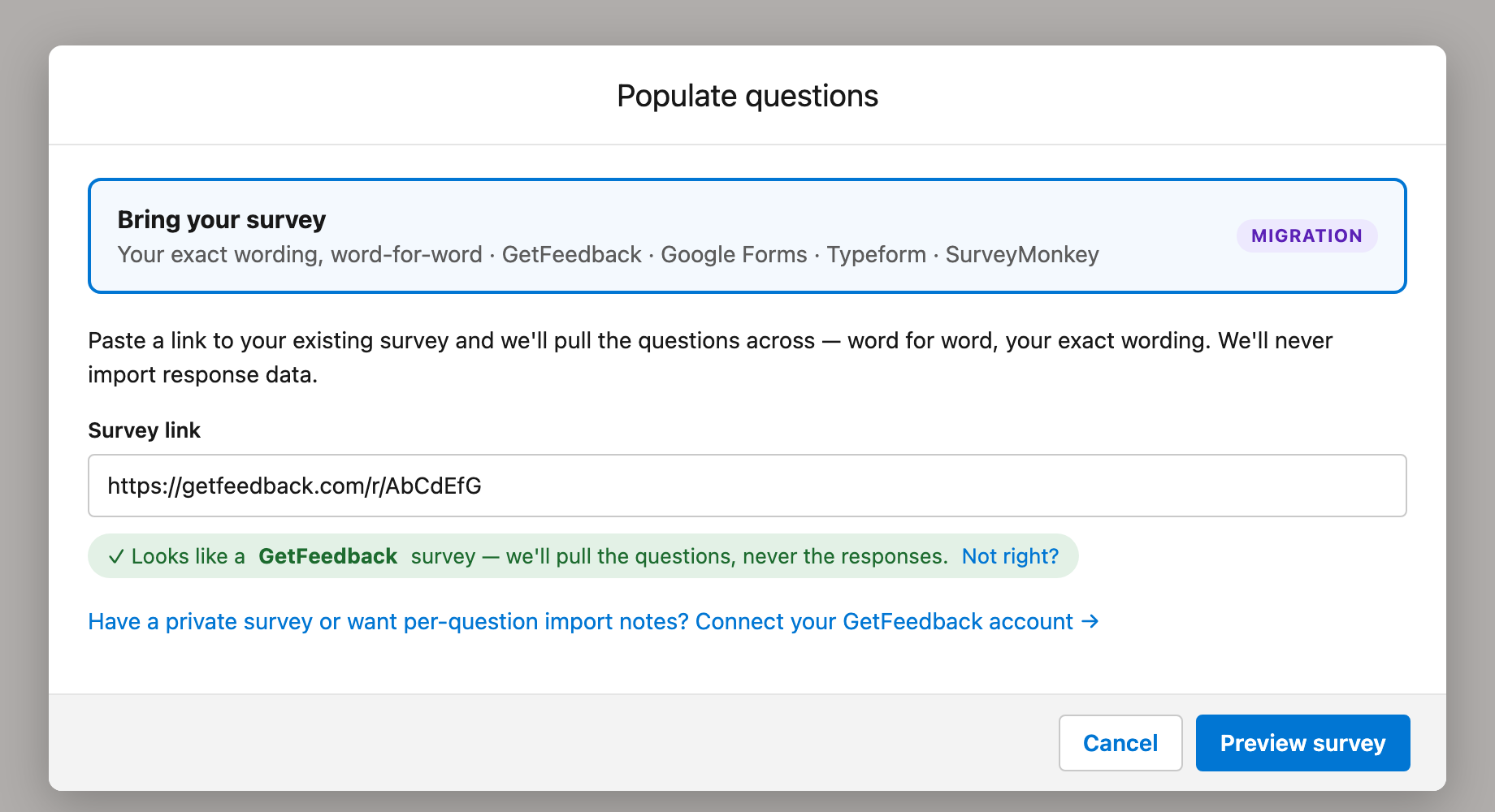
Paste the public link of a GetFeedback survey, or pick a survey from your GetFeedback account. AutoSurvey rebuilds the questions, the choices, the piping and the theme. You see a preview before AutoSurvey creates the survey.
AutoSurvey imports the survey, not its responses. Past responses stay in GetFeedback.
SurveyMonkey, which owns GetFeedback, says on its GetFeedback product update page that GetFeedback Direct is not available after 31 December 2026. A Salesforce team that uses GetFeedback Direct must move its surveys.
AutoSurvey runs inside your own Salesforce org. Its importer brings one GetFeedback survey at a time into AutoSurvey, with your wording. Then you send the survey from Salesforce.
Word for word.
AutoSurvey keeps the wording, the required flags, the choices in their order, "Other" and random choice order. It rebuilds NPS, rating, matrix, ranking, file upload, signature and other question types.
A preview before you import.
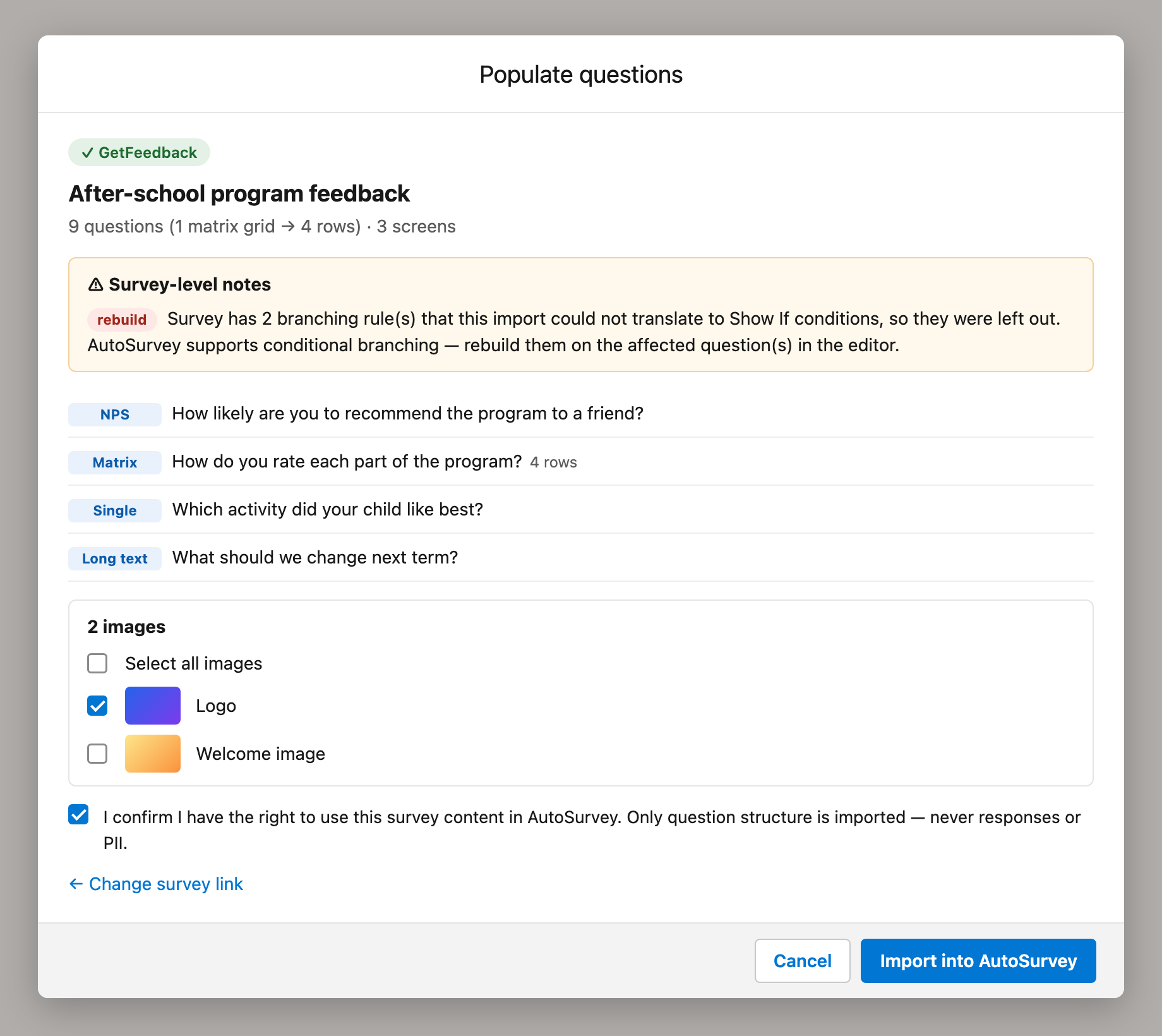
The preview lists each question and a note for each item that did not move. You confirm that you have the right to use the content. Then AutoSurvey creates the survey.
Your theme and your images.
AutoSurvey reads the colours, the background and the logo, and picks the closest built-in theme. You tick the images to copy into Salesforce Files.
The screens
These are design mockups. They use the real labels of the importer, with sample data for a fictional after-school program.
What it does, and what it does not do
What the importer does
- Reads a survey from its public GetFeedback link. No GetFeedback sign-in is necessary.
- Lists the surveys in your own GetFeedback account, after an admin adds your GetFeedback API key in Salesforce Setup.
- Rebuilds the questions, the choices, the screens and section breaks, the cover page text and the thank-you text.
- Keeps answer piping. Turns a fixed list of Case, Contact and Account merge fields into AutoSurvey merge fields.
- Copies the theme colours, the background image and the logo, as a best-effort match.
- Copies the images that you tick into Salesforce Files. An image that you do not tick keeps its GetFeedback link.
- Writes each note to a "Migration report" tab in the Google Sheet of the survey.
What it does not do
- It does not move past responses.
- It does not move branching rules. The preview counts them and tells you to rebuild them in the editor. Redirect and exit blocks do not move.
- It does not move picture-choice images, comment boxes, grid row shuffle or translations.
- It does not move GetFeedback Salesforce actions, links, email invites or the Flows that send GetFeedback surveys.
- It does not import more than one survey at a time.
- It does not sign in to GetFeedback with a button. An admin types the API key in Setup.
Two ways in
From the New survey window: choose "Bring your survey" and paste a public link. Click "Preview my survey", then "Create survey".
From the menu of a survey: choose "Populate questions…" or "Change questions…", then "Bring your survey". Paste a link, or connect your GetFeedback account. Click "Preview survey", then "Import into AutoSurvey".
Public link
The link that respondents use to take a GetFeedback survey. It looks like getfeedback.com/r/AbCdEfG.
Migration report
A tab in the Google Sheet of the survey. It lists each note from the import.
Best-effort theme
AutoSurvey picks the built-in theme that is closest to your GetFeedback colours. You can change it on the Design page.
Do you have GetFeedback surveys to move?
Send us the public link of one survey. We will import it with you and show you each note.
All data on these mockups is sample data for a fictional after-school program. GetFeedback and SurveyMonkey are trademarks of their owners. This page does not claim a relationship with either company.