Pre-GA · Founding customer program
Help shape the process-native runtime before GA

Feedback that becomes Salesforce action

The survey is only the first lap. The finish line is a Salesforce record.

AutoSurvey builds and runs surveys inside Salesforce. Responses are created directly as Salesforce records — without an export-and-mapping project or a spreadsheet you have to touch.

Before

Prefill and personalize from the CRM record.

During

Branch and validate on the answers as they come in.

After

Score the response, write it to records, trigger the next step.

40s
Describe your survey — and the answer is already a Salesforce record
Polished native runtime — guest or behind login
Runs as a step in your own Flow
Responses are Salesforce records
Primary score stamped on submission
AI-assisted authoring, no Agentforce
Author & review

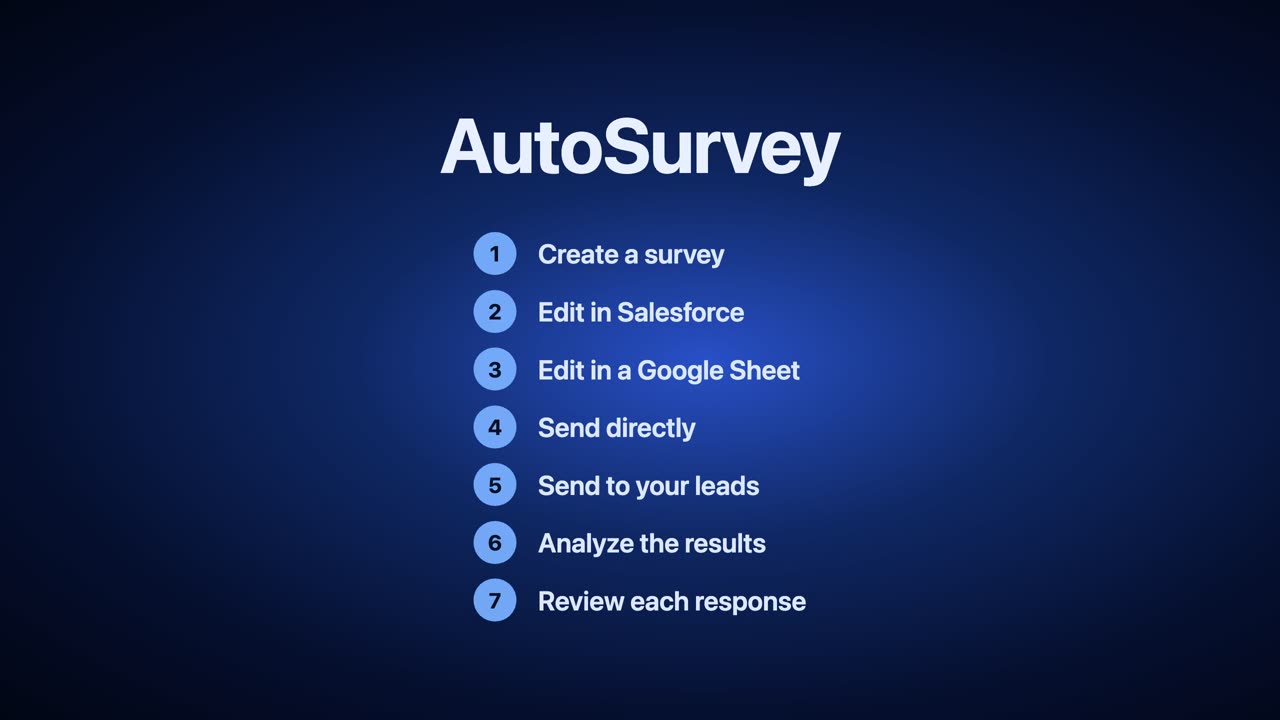
Your whole survey is a spreadsheet. Until you click Deploy.

Every question, every answer choice, every score — rows you can read top to bottom, bulk-edit, comment on, and diff against last week. Then one click turns it into a native Salesforce Flow.

In every major survey tool, reviewing the questionnaire means clicking into questions one at a time. AutoSurvey is the only one where the entire survey is rows in a spreadsheet — bulk-edit, comment, version history — and one click redeploys it as a native Salesforce Flow.

Review it the way you review a document

Forty questions on one surface instead of forty panels. Retitle a whole column, fix the scale on every rating at once, hand it to a colleague for comment, and see exactly what changed between versions.

You never have to open it

The spreadsheet layer is a Google Sheet AutoSurvey creates and manages for you. Generate with AI, edit questions inside Salesforce, or bring a CSV — all of that works without you ever opening the Sheet. It's there for the people who want it, and out of the way for everyone else.

Deploy is the moment it gets real

Until you click Deploy it's a draft you can wreck without consequence. Deploy compiles it into a native Salesforce Flow and question records that live in your org — yours to report on, extend, and govern.

Preview: a survey as spreadsheet rows, deployed as a Salesforce Flow
34s
A Google Sheet becomes a native Salesforce Flow

How the round-trip actually works. AutoSurvey keeps a Google Sheet for each survey, created and managed by us — that Sheet is what makes the live round-trip possible. Excel and CSV are supported as entry points: bring a file in to start from, then the AutoSurvey-managed Sheet is the copy that stays in charge.

Why this matters more than it sounds: in most survey tools, deleting a question destroys the answers already collected against it, or the version locks and you clone the survey to change anything. (One exception we know of: Jotform's Revision History can recover deleted-field data, for the account owner only.)

The short version

From response to next step — in Salesforce

Thirty seconds on what AutoSurvey does: every survey response becomes a Salesforce record the moment it's given — nothing to export or import, ready for the Flows and reports you already use.

Preview: the AutoSurvey dashboard-reveal motion graphic
31s
AutoSurvey — the 30-second story
How it works

From low CSAT to service recovery, in one Salesforce process

A Case closes. Salesforce sends the survey. The customer gives it a two. Most tools would drop that score into a dashboard nobody opens until Friday. AutoSurvey stamps the score onto the response record the moment it's submitted — the Flow updates the Case, opens a recovery Task for the owner, escalates the severe complaints to the service manager, and the whole thing lands in dashboards your team already reads. No exported spreadsheet. No second survey cloud to reconcile.

1

Case closes

Your process reaches the point where feedback matters — and the send action fires from your own record-triggered Flow.

2

Survey sent

Salesforce emails each contact a unique invitation link — the same engine behind Campaign and list sends.

3

Scored on arrival

The response lands as a Salesforce record with the primary score, metric type, and band stamped as fields — plus a negative-score flag.

4

Flow branches

Update the Case, open a recovery Task, route detractors to a manager — standard Salesforce automation on the scored record.

5

Team sees it

Native Salesforce reports on packaged report types — no export, no second tool. Build your own dashboard on top with one admin click to open the folder.

Preview: the Daily Grind post-case CSAT survey running in Salesforce, ahead of the service-recovery branch
66s
The post-case CSAT survey, from AI draft to insights
Salesforce sends the survey to the contact

Salesforce sends the survey to the contact.

The response lands as a Salesforce record

The response lands as a Salesforce record.

The team reads it in a native Salesforce report

The team reads it in a native Salesforce report.

The acting step runs in a record-triggered Flow you configure — standard Salesforce automation on the scored response record, not a proprietary rules engine.

Send & collect

Launch from a Campaign, a list, a link — or your own Flow

Wherever the audience lives, the send starts in Salesforce and the responses come home to it.

Campaign send

Pick the Campaign and send. Every member gets their own invitation link, and invitations and responses are attributed back to the Campaign Member.

Send to a list

Paste addresses. AutoSurvey matches existing Contacts and Leads, optionally creates Leads for the rest — with explicit admin confirmation — and sends. No Campaign required.

Link & QR

Run it on a public Experience Cloud page — CAPTCHA'd and rate-limited — share the link, or copy a QR code straight to the clipboard. Or keep it behind login for internal teams.

Triggered send

Drop the "Send AutoSurvey Invitation" action into any record-triggered Flow — Case closed, Opportunity won, onboarding complete — and the invitation goes out the moment the process gets there.

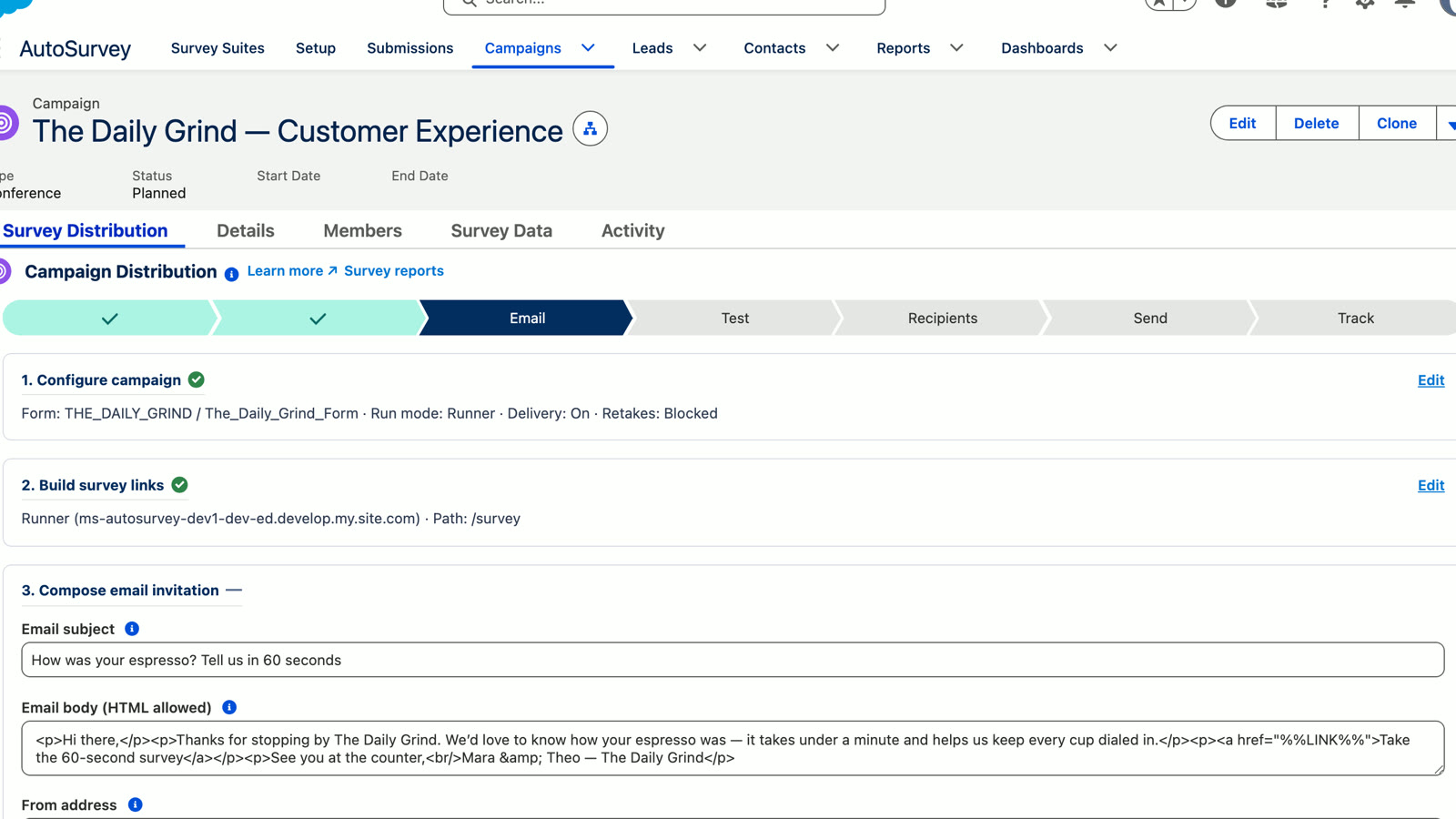
Sending a survey to a Salesforce Campaign with AutoSurvey
45s
Campaign send, end to end

Sending safeguards & auditability

Reminders Suppression & unsubscribe Daily send caps Append-only consent audit trail Verified-email double opt-in for guests SPF/DMARC guidance built in

However it's launched, the response lands in Salesforce ready for scoring, Flow, and reporting.

Where it fits

Built around the processes your team already runs

CX & Service

Post-case CSAT that fires when the Case closes. Every response is scored on arrival — detractors get escalated to a manager, recovery Tasks land on the owner, and the Case updates from the score. Your service queue does the follow-up, not a separate feedback inbox.

Sales & RevOps

Lead-qualification surveys that qualify during the survey and route high-intent responses straight to the right rep the moment they submit. Enrich the Lead from the answers and trigger SDR follow-up while the intent is fresh. Most survey tools make this a custom integration project; here the response is already a Salesforce record.

Marketing

Campaign and event feedback attributed back to the Campaign Member, with standard Salesforce automation to segment respondents into the right nurture. Moving off a legacy tool? Import the survey structure and make it Salesforce-native.

GetFeedback, Typeform, Google Forms & SurveyMonkey import.

Create & import

Build the survey as fast as you can list the questions

Start from a prompt, paste a question list, bring a spreadsheet or CSV/JSON, or import an existing survey. AutoSurvey turns rough inputs into a Salesforce-native survey — no dragging questions in one at a time. AI-assisted authoring is included; no Agentforce project, no separate Salesforce AI license to buy.

Generate from a prompt or a page

Tell AutoSurvey what you want to learn, or give it a page to read, and it drafts real questions with the right Salesforce field types. Tune tone and persona so it doesn't sound like a robot wrote it. Then you edit, because you know your customers.

Ground it in your business — paste a product or campaign URL and AutoSurvey grounds the questions in what's on the page.

Already drafting in ChatGPT, Claude or Gemini? Grab our authoring prompt →

Paste a list or a spreadsheet

Already have the questions written down? Paste the list, or bring a spreadsheet, CSV, or JSON, and AutoSurvey builds the whole survey at once. No blank canvas, no clicking questions in one at a time.

Questions already in a spreadsheet? Google Sheets, Excel, or CSV works as an entry point. Bring it in once, then run the survey natively in Salesforce.

Import from the tool you're leaving

Bring surveys over from GetFeedback, Typeform, and Google Forms by pasting the public link, or connect SurveyMonkey (API-assisted). The structure comes with you — you make it Salesforce-native from there.

Moving off GetFeedback? GetFeedback Direct retires December 31, 2026. Bring the survey structure with you, then make it native to Salesforce. See the GetFeedback guide

Step-by-step migration guides: all providers · GetFeedback · Typeform · SurveyMonkey · Google Forms

Salesforce-aware question and storage types

NPS Star rating Slider Matrix grid Likert scale Single & multi-select Ranking Short & long text Date & time Currency Email / phone / URL File upload Signature Consent Encrypted text
Native Salesforce field types, not stringsAnswers land in real Salesforce fields — number, date, picklist, checkbox and more — so a rating is a number and a date is a date.
Conditional logicShow or hide a question — or skip an entire screen — based on any earlier answer.
Reports like real CRM dataSum, average, filter by date, group by picklist, roll up and chart — no parsing text blobs or formula gymnastics.

However the survey starts, it ends up native. Refine it, publish it, and drop it into the Salesforce Flow that sends it, routes on the answers, writes back to the record, and follows up.

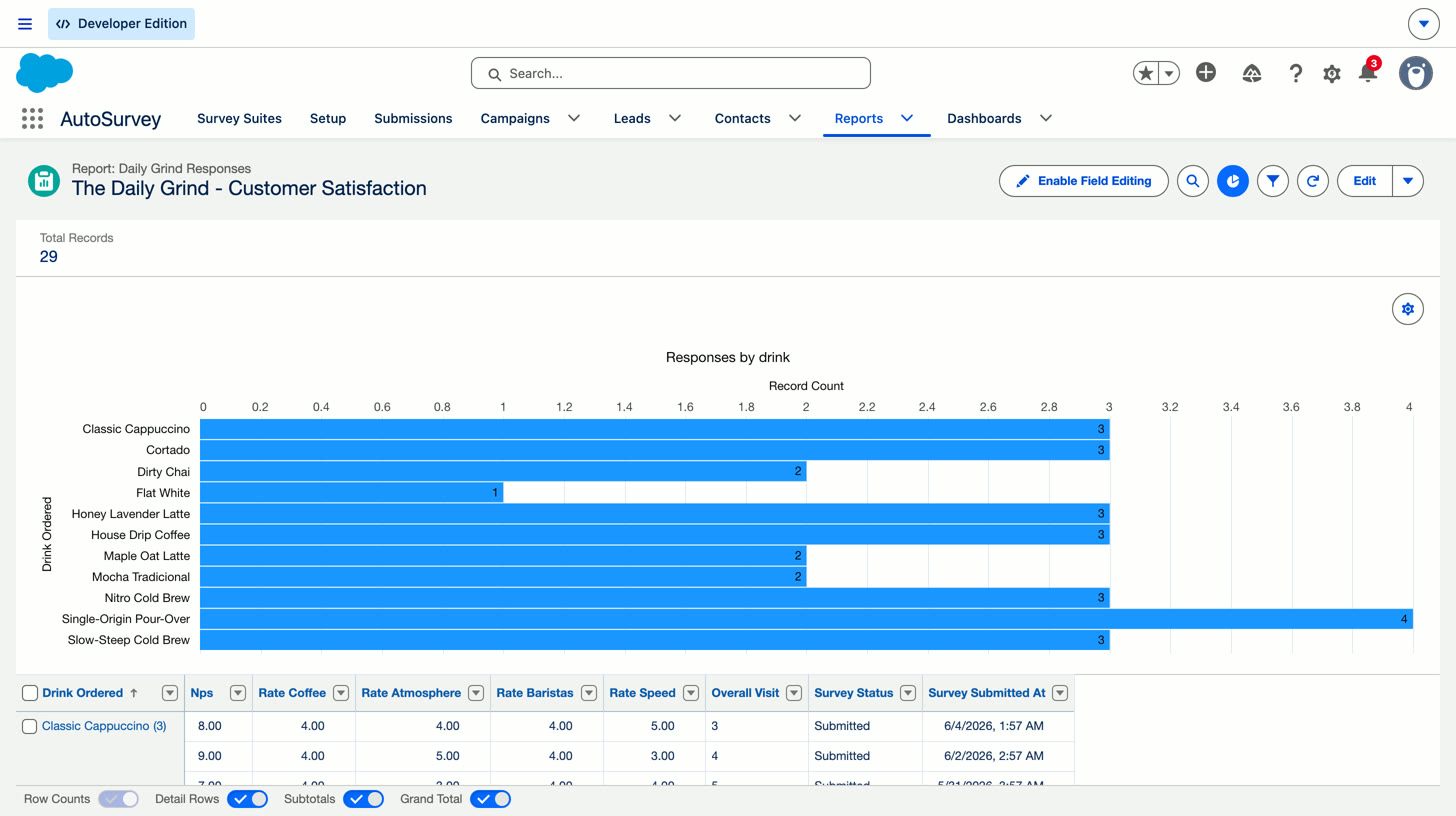
Preview: a native Salesforce report on survey responses — responses by drink, with NPS and rating subtotals, chart and grouped data
46s
Submissions to native Salesforce reports — no export, no second dashboard
Your data

Every response is a Salesforce record, stored in your org and reportable like any CRM data

Every response is stored in your org, reportable in Salesforce, available to Flow, and governed by your admins. When someone answers, the record already lives where your team works.

A One record per response — a flat object for native Reports and Dashboards

The shape most admins expect: one row per submission, each question its own field, plus Audience, Wave/Round, Started, Completed and Status. Because it's a normal object, native Salesforce Reports & Dashboards work on it out of the box — group by Audience, chart % Completed, no extra setup.

B One record per answer — an EAV table for BI tools like Tableau

One row per answer (question key + value), so the schema never changes when your questions do. Ideal for tracking results across changing question sets and for feeding BI tools like Tableau or CRM Analytics — a tall answer table is exactly what they want for pivots, trends and cross-survey analysis.

You get both, automatically — native Salesforce reporting on the object, plus a flexible answer table for BI tools. No decision up front.

Response data stays in your Salesforce org. AI authoring uses hosted Claude and only ever sees what you send it to draft a survey — a prompt or a page URL, never a response.

Insights built in

Per-suite insights in the app — completion, NPS, drop-off — before you build a single report.

CX report types, ready to build on

Score trends and bands ship as native report types and reports — one admin click to share the folder in Setup Home, then build your own dashboard on top with standard Salesforce tools. No dashboard to buy or wait on.

Exports for BI

Six export formats, from a flat submission list to a full analysis package for Tableau or CRM Analytics.

Data-quality controls

Flag junk responses out of analytics without deleting them, and grant a retake when someone deserves one.

For Salesforce admins

Built for admins who have to govern what automation touches

AutoSurvey is a managed package that runs on the controls you already own. Your data, your permissions, your Flow.

Managed package, standard metadata

Installs clean, runs on standard Salesforce metadata, and your admins govern it like anything else in the org.

Your response data, your org

Response data is stored as records in your Salesforce org. It doesn't get shipped to a vendor's survey cloud.

Admin-controlled Flow orchestration

You compose the survey into your own Flow and control exactly what it reads, writes, and triggers. Scored responses are records — your Flows, permissions, and sharing rules decide what happens next.

Native security model

Profiles, Permission Sets, Sharing, and Field-Level Security apply the way they do everywhere else in Salesforce.

Sending safeguards & auditability

Suppression and unsubscribe, org-level daily caps, and an append-only consent audit trail on every send channel.

Accessibility-hardened runtime

The respondent experience is hardened against WCAG AA criteria — keyboard, screen reader, and contrast included.

Guest or authenticated runtime

Run behind login or on a public Experience Cloud page, with CAPTCHA and rate-limiting for guests.

On-platform and reviewable Roadmap

Runs on-platform; a formal security-review path follows as we approach AppExchange listing.

AutoSurvey is pre-GA. Founding customers get direct implementation support and staged access to the process-native runtime as it hardens.

The difference

Everyone is fast at step one. Look at the rest of the race.

Every survey tool has AI authoring now — that part is table stakes. The difference shows up in the five stages after it, and in one stage most of all: getting the answer onto the record your team works from. Here's the categorical split, stage by stage.

63% of large companies rated themselves good or very good at soliciting customer feedback. But “only about one-quarter feel equally as confident about their ability to make changes to their business based on those insights”.

Temkin Group / XM Institute, State of VoC Programs 2017 — Q3 2017 CX Management Survey, base of 186 organisations with $500M or more in annual revenues. Self-assessment by the practitioners who run those programmes; quoted in the report's own words.

Stage Old model AutoSurvey model
Authordraft the questions Minutes with AI — genuinely good. But an AI draft can arrive using question types your plan isn't allowed to send. Minutes with AI too, and it's included — no separate Salesforce AI license, no Agentforce project.
Publish gatewhat stops you sending Skip logic, rating types, file uploads, or simply too many questions can move you to a paid tier after you've built the survey. One per-org price. Logic, scoring and question types aren't the upsell.
Distributereach known contacts Email sending is often a paid tier; free tiers hand you an anonymous link — so "who answered this?" becomes a matching problem you inherit. Campaign send, list or triggered email, public link or QR, Experience Cloud — the recipient is already a Salesforce record, so identity is never guessed.
Collectwhat happens at the cap Response caps behave differently and none of them fail loudly: viewing can lock while collection continues, live forms can go private at the cap, or collection can simply stop. Your org's own limits. No per-response meter deciding whether you get to read your data.
Land in CRMthe expensive stage An integration tier plus an admin-built field mapping, per survey, kept in repair as questions change — or the export → match-by-email → import loop, run by hand every wave, forever. This stage does not exist. Responses are created as records in your org, linked to the contact and campaign on arrival. Nothing to map, sync, or export.
Actdo something about it Rebuild the follow-up logic on the Salesforce side, after the data finally arrives — a second automation to keep in step with the first. Score fields are stamped at submission, so your existing Flows branch on the answer immediately — Tasks, Cases, alerts, reports.

"Old model" describes the common non-process-native pattern, not any one vendor. Comparisons are categorical.

Want this named and sourced, tool by tool? See the comparison pages →

Founding partners

We're onboarding a few teams by hand right now

AutoSurvey is in early access, ahead of our AppExchange listing. We're working directly with a small group of Salesforce teams, free while we do, and locking in founding pricing for anyone who stays. Three months free in your sandbox now, three more in production the day we list on the AppExchange. You get the full product and a direct line to the founder. We get honest feedback on a real survey.

The full product, free

Everything AutoSurvey does today, in your sandbox first and in production at launch. No card, no response cap.

A hands-on migration plan

Leaving GetFeedback or Delighted? We'll give you a hands-on migration plan before you commit. GetFeedback structure import is available today; other structures and historical data are assessed separately.

A line to the founder

Two or three short calls. What you flag tends to ship. Founding pricing is locked in if you continue.

Responses stay in your org Priced per org, not per response AI generation included, no Agentforce No lock-in

Limited to a handful of founding partners. Prefer not to book yet? Send a few details instead.

Tell us about your Salesforce process

A couple of details and we'll figure out whether AutoSurvey fits where you need feedback to trigger action.

Goes straight to Erik. No newsletter, no sharing your details.

Frequently Asked Questions

Platform & process

What does "process-native" mean?
The survey runs as a step inside your own Salesforce Flow instead of off to the side in a separate tool. Personalize it from CRM data before it runs, branch on the answers while it runs, and turn scored responses into records, Tasks, and routing the moment they're submitted — all in the Flow your admins already govern. No sync, no mapping layer, no separate work queue.
What's included?
The survey runtime on a guest or authenticated page; AI-assisted authoring including URL grounding; import from GetFeedback, Typeform, Google Forms, and SurveyMonkey; Campaign, pasted-list, and Flow-triggered sends with reminders and suppression; public link & QR; responses as Salesforce records with the primary score stamped on submission; the survey as a step inside your own Flow — prefill, mid-survey routing, post-submit automation; native CX report types and reports (share the folder with one click, then build your own dashboard); and exports for BI. We're pre-GA: founding customers get staged access with direct implementation support, and we'll tell you exactly where the build is before you commit to anything.
Do I have to build a Flow to use it?
No. The survey runs on an Experience Cloud or Lightning page with no Flow at all, and you can send from a Campaign or a pasted list without building anything. Flow is how you go deeper: one action sends invitations from any record-triggered process, and a record-triggered Flow on the scored response adds the routing and follow-up — standard Salesforce, and we'll help configure your first one. Start simple, go deeper when you want to.

Data & security

Where does the response data live?
In your Salesforce org, as records — one flat row per submission for native reporting, plus a per-answer table for BI tools. Response data isn't held in a vendor cloud. AI authoring uses hosted Claude, and it only ever sees the prompt or URL you send it to draft a survey — never a response.
How does security work for admins?
AutoSurvey is a managed package that runs on the Salesforce controls you already have: Profiles, Permission Sets, Sharing, and Field-Level Security. The Flow orchestration is yours to configure, so you decide what the survey reads, writes, and triggers. Guest pages get CAPTCHA and rate limiting; sends get suppression, caps, and an append-only consent audit. A formal security-review path follows as we approach AppExchange listing Roadmap

Migration & pricing

I'm on GetFeedback. Can I move?
Yes, and the timing is real: GetFeedback Direct retires December 31, 2026. Structure import from GetFeedback is in the current build — paste the survey link or connect the API, and the questions, screens, and logic notes come across. Then it's native to your Salesforce org: responses become records and feed your reports and automation. We'll put together a hands-on migration plan with you before you commit; historical response data is assessed separately.
What does it cost?
We're pre-GA and onboarding founding customers by hand — free while we do, with founding pricing locked in if you stay. Pricing is per org, not per response, and AI-assisted authoring is included — no separate Agentforce project. See the founding-partner page for how the program works.

Put the survey where the work already happens

Founding customers are shaping the process-native runtime right now — the send, capture, scoring, and reporting run today, and the orchestration hardens with the people using it.